FVG Tracker Pro (@JP7FX)FVG Tracker Pro (JP7FX)
FVG Tracker Pro monitors single timeframe Fair Value Gaps and tracks their behaviour over time. It shows when an FVG forms, when it closes and which candle completes the mitigation.
Features
• Tracks old FVGs so users can review how price interacted with previous gaps.
• Highlights when an FVG is fully mitigated and identifies the closing candle.
• Alerts for new FVG creation and FVG mitigation.
• Optional bar colours, visibility filters and 50 percent lines.
• Works on any asset and timeframe.
How It Helps
• Allows users to follow the lifecycle of each FVG.
• Reduces manual work by marking creation and mitigation automatically.
• Helps traders who study Smart Money concepts and price inefficiencies.
Alerts
Alert conditions are included for:
• New FVG creation
• Full mitigation of an FVG
Users can tailor alert settings to match their preference.
Pesquisar nos scripts por "track"

Two assets correlation trackerHi, I made this simple script to see how two correlated assets are actually performing short-term. The idea comes from correlation between BTC and ETH that that usually stands 0.9 (Pearson's correlation). However Pearson's correlation doesn't indicate the relative price difference and cannot be used trading correlation when used alone.
My approach is simple - we can select the date/time from which we will start tracking the price change, and instead of tracking the price, we track 100 USD worth of BTC and ETH and how this investment perform. This gives us the price difference relative to a point in the near future, I would suggest using latest trend shift, for example.
On example of how this can be used: If we see that BTC is falling slower than ETH since trend shift, we can long BTC and short ETH in equal parts and expect to gain from the difference while hedging potential loss.

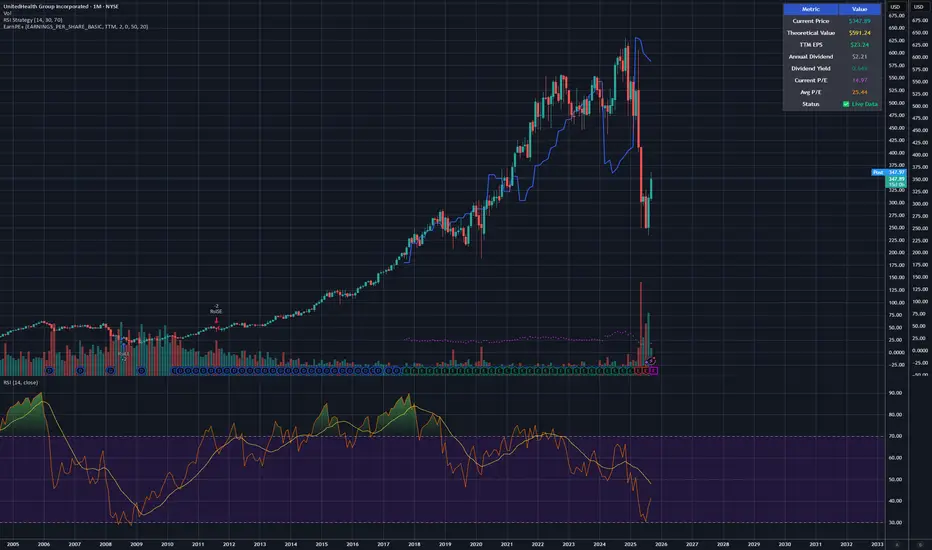
Earnings line & P/E Tracker# Earnings line & P/E Tracker
**A comprehensive fundamental analysis indicator that overlays earnings data and P/E ratios directly on your price charts.**
## 📊 Key Features
### Automatic Data Retrieval
- **Real-time financial data** pulled directly from TradingView's financial database
- **Multiple data sources**: Earnings Per Share (Basic/Diluted), Total Revenue, Net Income
- **Flexible periods**: TTM (Trailing Twelve Months), FQ (Quarterly), FY (Annual)
- **Live P/E ratio calculation** based on current price and TTM earnings
### Visual Display Options
- **Earnings progression line** overlaid on price chart for easy comparison
- **P/E ratio plot** with distinctive circle markers
- **Comprehensive data table** showing all key metrics in real-time
- **Dark mode optimized** with high-contrast colors for excellent readability
### Optional Event Tracking
- **Custom earnings dates** input for upcoming releases
- **Visual markers** on earnings announcement dates
- **Background highlighting** during earnings weeks
- **Smart alerts** for significant P/E changes and data updates
## 🎯 Perfect For
- **Fundamental analysts** comparing earnings growth vs stock price movement
- **Value investors** tracking P/E ratios and earnings trends
- **Earnings season trading** with visual release date markers
- **Long-term investors** monitoring fundamental health alongside technical analysis
## ⚙️ Customization Options
### Data Selection
- Choose between EPS Basic, EPS Diluted, Total Revenue, or Net Income
- Select TTM, quarterly, or annual reporting periods
- Toggle individual display elements on/off
### Visual Styling
- Customizable colors for earnings line, P/E ratio, and event markers
- Adjustable line width and styling options
- Moveable data table with size and position controls
### Event Management
- Input custom earnings release dates
- Enable/disable earnings event markers
- Background highlighting for earnings periods
- Configurable alert thresholds
## 📈 How It Works
1. **Automatic Detection**: The indicator automatically detects available fundamental data for your selected symbol
2. **Real-time Updates**: Financial metrics update as new data becomes available
3. **Visual Integration**: Earnings data is scaled and overlaid directly on your price chart
4. **Status Monitoring**: Clear indicators show data availability and freshness
## 🔧 Setup Instructions
1. Add the indicator to your chart
2. Select your preferred data source (EPS recommended for P/E tracking)
3. Choose time period (TTM recommended for most analyses)
4. Customize colors and display options to your preference
5. Optionally add upcoming earnings dates for event tracking
## 💡 Pro Tips
- **Use TTM EPS** for the most accurate P/E ratio calculations
- **Compare earnings line slope** with price movement to spot divergences
- **Enable earnings events** to prepare for volatility around announcements
- **Works best on daily/weekly timeframes** for fundamental analysis
## ⚠️ Data Availability
- Requires stocks with available fundamental data in TradingView's database
- Most major US stocks, ETFs, and international equities supported
- Limited data may be available for small-cap or recently listed companies
- Clear "No Data" indicator when fundamental data is unavailable
## 🎨 Display Features
- **High contrast colors** optimized for both light and dark chart themes
- **Clean, professional table** displaying all key metrics
- **Intuitive visual markers** for earnings events and data points
- **Responsive design** that adapts to different chart sizes
---
**Perfect for traders and investors who want to combine fundamental analysis with technical charting in a single, comprehensive view.**
## ⚠️ Important Disclaimer
**This indicator is provided for educational and informational purposes only. The author (raptor2030) is not responsible for:**
- **Data accuracy or completeness** - Financial data is sourced from TradingView's database and may contain errors, delays, or omissions
- **Trading decisions** - This tool should not be used as the sole basis for investment decisions
- **Financial losses** - Past performance does not guarantee future results
- **Data reliability** - Third-party data sources may experience outages or provide incorrect information
- **Market timing** - Earnings dates and projections may be inaccurate or outdated
**Always verify critical information from official company sources and consult with qualified financial professionals before making investment decisions.**
**Use this indicator at your own risk. The author disclaims all liability for any direct, indirect, or consequential damages arising from the use of this script.**
Crypto Portfolio vs BTC – Custom Blend TrackerThis tool tracks the performance of a custom-weighted crypto portfolio (SUI, BTC, SOL, DEEP, DOGE, LOFI, and Other) against BTC. Simply input your start date to anchor performance and compare your basket’s relative strength over time. Ideal for portfolio benchmarking, alt-season tracking, or macro trend validation.
Supports all timeframes. Based on BTC-relative returns (not USD). Open-source and customizable.

Smart Trend Tracker Name: Smart Trend Tracker
Description:
The Smart Trend Tracker indicator is designed to analyze market cycles and identify key trend reversal points. It automatically marks support and resistance levels based on price dynamics, helping traders better navigate market structure.
Application:
Trend Analysis: The indicator helps determine when a trend may be nearing a reversal, which is useful for making entry or exit decisions.
Support and Resistance Levels: Automatically marks key levels, simplifying chart analysis.
Reversal Signals: Provides visual signals for potential reversal points, which can be used for counter-trend trading strategies.
How It Works:
Candlestick Sequence Analysis: The indicator tracks the number of consecutive candles in one direction (up or down). If the price continues to move N bars in a row in one direction, the system records this as an impulse phase.
Trend Exhaustion Detection: After a series of directional bars, the market may reach an overbought or oversold point. If the price continues to move in the same direction but with weakening momentum, the indicator records a possible trend slowdown.
Chart Display: The indicator marks potential reversal points with numbers or special markers. It can also display support and resistance levels based on key cycle points.
Settings:
Cycle Length: The number of bars after which the possibility of a reversal is assessed.
Trend Sensitivity: A parameter that adjusts sensitivity to trend movements.
Dynamic Levels: Setting for displaying key levels.
Название: Smart Trend Tracker
Описание:
Индикатор Smart Trend Tracker предназначен для анализа рыночных циклов и выявления ключевых точек разворота тренда. Он автоматически размечает уровни поддержки и сопротивления, основываясь на динамике цены, что помогает трейдерам лучше ориентироваться в структуре рынка.
Применение:
Анализ трендов: Индикатор помогает определить моменты, когда тренд может быть близок к развороту, что полезно для принятия решений о входе или выходе из позиции.
Определение уровней поддержки и сопротивления: Автоматически размечает ключевые уровни, что упрощает анализ графика.
Сигналы разворота: Индикатор предоставляет визуальные сигналы о возможных точках разворота, что может быть использовано для стратегий, основанных на контртрендовой торговле.
Как работает:
Анализ последовательности свечей: Индикатор отслеживает количество последовательных свечей в одном направлении (вверх или вниз). Если цена продолжает движение N баров подряд в одном направлении, система фиксирует это как импульсную фазу.
Выявление истощения тренда: После серии направленных баров рынок может достичь точки перегрева. Если цена продолжает двигаться в том же направлении, но с ослаблением импульса, индикатор фиксирует возможное замедление тренда.
Отображение на графике: Индикатор отмечает точки потенциального разворота номерами или специальными маркерами. Также возможен вывод уровней поддержки и сопротивления, основанных на ключевых точках цикла.
Настройки:
Длина цикла (Cycle Length): Количество баров, после которых оценивается возможность разворота.
Фильтрация тренда (Trend Sensitivity): Параметр, регулирующий чувствительность к трендовым движениям.
Уровни поддержки/сопротивления (Dynamic Levels): Настройка для отображения ключевых уровней.

Unfilled Gaps TrackerIndicator Description: Unfilled Gaps Tracker
Overview:
The Unfilled Gaps Tracker is a powerful TradingView indicator designed to identify and visualize unfilled gaps on a price chart. This indicator highlights bullish and bearish gaps with continuous horizontal bars, helping traders quickly identify potential areas of support and resistance.
Features:
Gap Detection: Automatically detects bullish gaps (where the current low is higher than the previous close) and bearish gaps (where the current high is lower than the previous close).
Continuous Visualization: Displays gaps as horizontal bars extending to the most recent candle. Bullish gaps are filled with green, and bearish gaps are filled with red.
Single Label per Gap: Each gap is labeled once, ensuring a clean and uncluttered chart. Labels move with the gap's right edge as new bars are added.
Dynamic Updates: Gaps are dynamically updated, and the visualization adjusts as new bars are added. Gaps are removed from the chart once they are filled by subsequent price action.
Multiple Gaps: Tracks multiple gaps simultaneously, providing a comprehensive view of unfilled gaps over time.
Usage:
Adding the Indicator:
To add the Unfilled Gaps Tracker to your chart, search for "Unfilled Gaps Tracker" in the TradingView indicators menu and apply it to your desired chart.
Interpreting the Indicator:
Bullish Gaps: Represented by green horizontal bars with the label "Bull Gap." These indicate areas where the price gapped up, potentially acting as future support levels.
Bearish Gaps: Represented by red horizontal bars with the label "Bear Gap." These indicate areas where the price gapped down, potentially acting as future resistance levels.
Trading Strategy:
Use the identified gaps to inform your trading strategy. Unfilled bullish gaps can be potential buy zones, while unfilled bearish gaps can be potential sell zones.
Monitor how the price interacts with these gaps. A gap fill (where the price moves back to close the gap) can provide valuable trading signals.

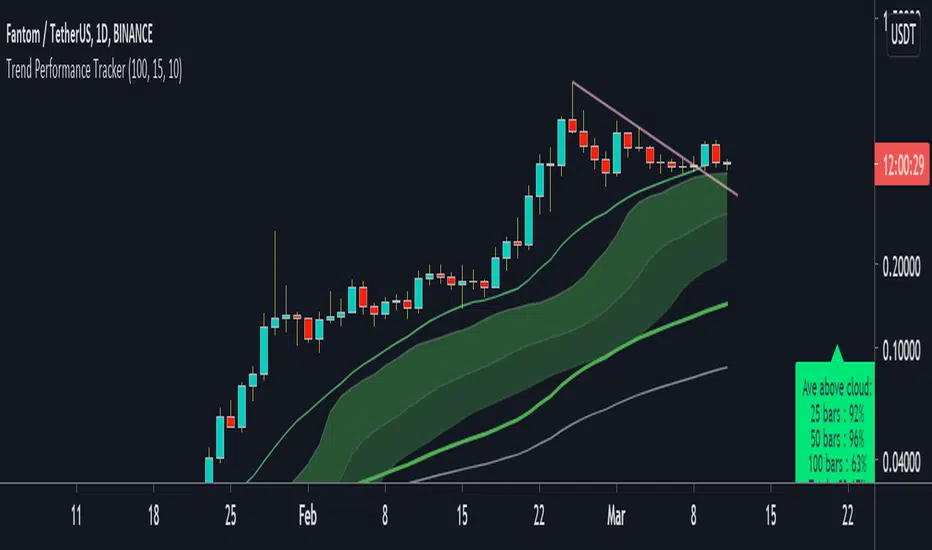
Trend Performance TrackerThis script is designed for trend trading. Currently set up for stocks long. It's main aim is checking the profitability of the trend trading system that it suggests.
How to use:
- When there is a sufficient trend and pullback for an entry yellow dots will appear under the bars. An buy-stop line (green) and a stop-loss line (red) also appear on the chart at this point.
- the script tracks having made a trade and continues to draw the stop-loss placement on the chart (red line)
- at the bottom of the chart you an see the script tracking the trades it would place.
- Yellow squares are a pending setup
- A green arrow and green squares are a open position
- A pink X means a losing trade and a green flag means a winning trade
- At the current bar will be data on how well the strategy would perform on that pair at that timeframe. "RR" is the total RR made over the number of trades (a bad trade is counted as -1). "win %" is the percentage of winning trades.
- If there RR is > 2 and win % is > 50%, the data box will show as green, indicating a good probability for trading success on that pair and time-frame at that moment.
Deviaton Tracker - QuantSyDeviation Tracker - QuantSy
An adaptive volatility band system that maps price behavior across statistical deviation zones. Provides visual context for market extremes and tracks duration patterns for probabilistic mean reversion analysis.
What it offers:
Dynamic bands that adjust to current volatility conditions, creating clear visual zones for price action. The system continuously monitors time spent in each zone and builds a statistical profile of typical duration patterns, helping identify when price may be overextended.
Best for:
Spotting potential reversal areas at volatility extremes
Understanding current price positioning relative to recent behavior
Timing entries and exits based on statistical probabilities
Risk management and position sizing decisions
Clean gradient visualization provides immediate context while the underlying statistical engine tracks behavioral patterns across all market conditions.
**⚠️ Disclaimer**
Educational tool only - does not constitute investment advice. The developer assumes no liability for any trading profits or losses incurred through the use/misuse of this indicator.
This indicator does not include any features related to interest, leverage, or gambling. Users are fully responsible for making sure their assets and trading practices align with Islamic guidelines.

Consolidation Tracker🧭 Consolidation Tracker — Visualize Market Reversals in Real Time
The Consolidation Tracker is a minimalist yet powerful tool designed to map the anatomy of market reversals and trend transitions. It highlights the structural evolution of price through four key phases, helping traders anticipate shifts with clarity and confidence.
🔄 The Four Stages of a Market Reversal:
Failure to Displace — Price fails to break beyond recent highs or lows, signaling potential exhaustion of the current trend.
Consolidation (CAMP) — A range-bound phase where price compresses between a dynamic high and low. These zones are shaded gray, representing indecision and balance.
Engulfing (ENGULF) — A decisive candle closes beyond the CAMP high or low, suggesting a directional shift. These are highlighted in orange.
Fair Value Gap (FVG) — A three-candle pattern forms a price imbalance. If this FVG also engulfs the CAMP range, it confirms the reversal and resets the CAMP. Bullish FVGs are shaded green, bearish FVGs in red.
🔁 From Reversal to Trend:
Once a reversal is confirmed via an FVG, the market often transitions into a trend cycle characterized by:
Displacement — Strong directional movement away from the prior range.
Fair Value Gaps — Continuation imbalances that offer high-probability entries on retracements.
🧠 How It Works:
The indicator dynamically tracks CAMP highs and lows, updating only when a candle engulfs the range or a valid FVG forms.
FVGs are detected when a three-candle sequence creates a gap between candle 2 and 0, and the middle candle (candle 1) breaks the CAMP boundary.
CAMP levels are plotted as horizontal lines, while background colors narrate the evolving structure in real time.
This tool is ideal for traders who value market structure, price efficiency, and narrative clarity. Whether you're anticipating reversals or riding trends, the Consolidation Tracker offers a clean, actionable lens into price behavior.

FVG TrackerThis indicator automatically detects and tracks Fair Value Gaps (FVGs) on your chart, helping you quickly spot imbalances in price action.
Key Features:
📍 Identifies FVGs larger than 3 contracts
📐 Draws each valid FVG as a rectangle directly on the chart
⏳ Removes FVGs once they are fully filled
🔟 Keeps track of only the 10 most recent FVGs for clarity
⚡ Lightweight and optimized for real-time charting
This tool is ideal for traders who use FVGs as part of Smart Money Concepts (SMC) or imbalance-based strategies. By visually highlighting only meaningful gaps and clearing them once filled, it ensures a clean and actionable charting experience.

Order Block Breakout TrackerOrder Block Breakout Tracker
The Art of Trading Through Order Blocks
________________________________________
Overview:
The Order Block Breakout Tracker indicator is designed for traders to identify and track key order block levels in the market, providing visual cues and alerts when these levels are broken. This indicator helps traders spot potential market reversals, trend changes, and breakouts in real time. With adjustable parameters and customizable visuals, it is suitable for various trading strategies and market conditions.
________________________________________
Key Features:
1. Order Block Identification:
• Automatically detects and draws Bullish and Bearish Order Blocks based on significant price action patterns.
• Bullish OB: Identified when the price forms a strong bullish candle with a higher close.
• Bearish OB: Identified when the price forms a strong bearish candle with a lower close.
2. Customizable Visuals:
• Color Settings: Choose your preferred colors for bullish and bearish order blocks, including their labels.
• Label Customization: Set specific colors and styles for the labels to enhance clarity.
• Opacity Control: Adjust the transparency of order block zones to better visualize price action.
• Line Thickness: Define the thickness of the order block lines for better visibility.
3. Breakout Detection and Alerts:
• Detects when an Order Block is broken, signaling potential entry or exit points.
• Alert Conditions: Receive real-time alerts when a bullish or bearish order block is broken, keeping you informed of critical price movements.
• Bar Color Change: Optionally change the bar color when an order block is broken to indicate a shift in market sentiment.
4. Line Extension Feature:
• Extend broken order block lines for a customizable number of bars (up to 3 bars by default) after the breakout. This feature gives traders a visual reference for further price movement after a breakout.
5. Timeframe Control:
• Display order blocks only on timeframes above a specified minimum timeframe to ensure reliable signal generation.
• Dynamic Timeframe Filtering: Customize the indicator to only show order blocks on higher timeframes for more significant trends.
6. ATR-Based Filter for Candle Size:
• Filter out insignificant price action by adjusting the minimum candle size using an ATR multiplier.
• Ensures that only meaningful candles are considered for order block identification, reducing noise.
________________________________________
Customization Inputs:
• Show Order Blocks: Toggle the visibility of order blocks on the chart.
• Keep Broken OB: Option to keep broken order blocks on the chart for historical reference.
• Opacity: Set the transparency level of the order block zones.
• Bullish and Bearish OB Colors: Customize the colors for bullish and bearish order blocks.
• Line Extension: Extend order block lines by a specified number of bars after a breakout.
• Bar Color on Break: Change the color of bars when an order block is broken.
• Minimum Timeframe: Set the minimum timeframe for displaying order blocks.
________________________________________
Trading Strategy:
• Bullish Order Block: When a bullish order block is identified, it marks a potential support zone where price could reverse higher.
• Bearish Order Block: When a bearish order block is identified, it marks a potential resistance zone where price could reverse lower.
• Breakout Signals: A breakout above a bearish order block or below a bullish order block signals a continuation in the direction of the breakout.
________________________________________
Alerts and Notifications:
Set up real-time alerts when:
• A Bullish OB is broken.
• A Bearish OB is broken.
• Any Order Block is broken.
________________________________________
Use Cases:
• Day Traders: Quickly spot and react to order block breakouts and reversals.
• Swing Traders: Track longer-term support and resistance levels based on order block zones.
• Scalpers: Identify short-term breakouts and make quick trades based on market structure.
________________________________________
Conclusion:
The Smart Order Block Zones indicator is an essential tool for traders who wish to enhance their market analysis by focusing on key price levels where significant institutional activity may be taking place. With its customizable features and real-time alerts, this tool helps you stay on top of critical market movements and make informed trading decisions.

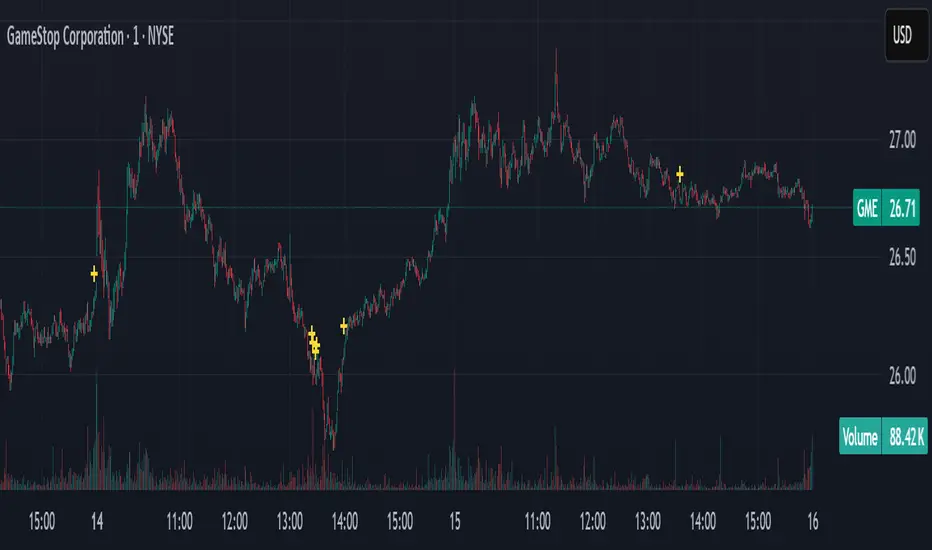
GME Bond Tracker [theUltimator5]This indicator tracks when GME 0.0% convertible notes, ticker GME6042202 sees trade volume and plots it on the chart.
This indicator is used to track bond-equity arbitrage between GME and the convertible notes. When the bonds trade, there is generally a large qualified contingent trade block at the same time, so the underlying stock volume can be matched against the bond trading.
This is used to help predict future movements of GME, as well as perform trend and reaction analysis on the bond/equity arbitrage events.
Stock Highs Tracker with IndicesThis Pine Script indicator tracks stock highs and compares them with major indices (Nifty, Nifty 500, CNX-SmallCap, and CNX-MidCap). Here’s what it does:
1. Retrieves and Displays Key Price Metrics
All-Time High (ATH): The highest price the stock has ever reached.
52-Week High: The highest price in the last 252 trading days.
Current Price: The stock’s closing price.
2. Calculates Percentage Differences
% from ATH: How much the stock is below its all-time high.
% from 52WKH: How much the stock is below its 52-week high.
3. Fetches and Compares with Indices
It retrieves similar metrics (ATH, 52-Week High, Current Price, % from ATH, % from 52WKH) for:
Nifty 50
Nifty 500
CNX-SmallCap
CNX-MidCap
This helps in assessing whether the stock's movement aligns with broader market trends.
4. Displays Data in a Table
The script creates a table positioned at the top-right corner.
It color-codes different rows for easy readability.
The table compares the stock’s performance against the major indices.
Use Case
Helps traders and investors track stock highs relative to market indices.
Identifies whether the stock is outperforming or underperforming the broader market.

Optimized Trend Tracker Oscillator OTTOOTTO - Optimized Trend Tracker Oscillator is a derivative of Anıl Özekşi's OTT - Optimized Trend Tracker:
It is more sensitive to price movements when compared to its ancestor OTT.
There are 2 more parameters of VIDYA moving average lengths FAST and SLOW.
Fast VIDYA has length of 10 bars and Slow VIDYA has 25.
Correction Constant is a crucial parameter to make the calculation more stable.
you can use 1000 to 100000000 by the powers of ten to obtain more accurate graphic values.
Buy and Sell signals make indicator more meaningful.

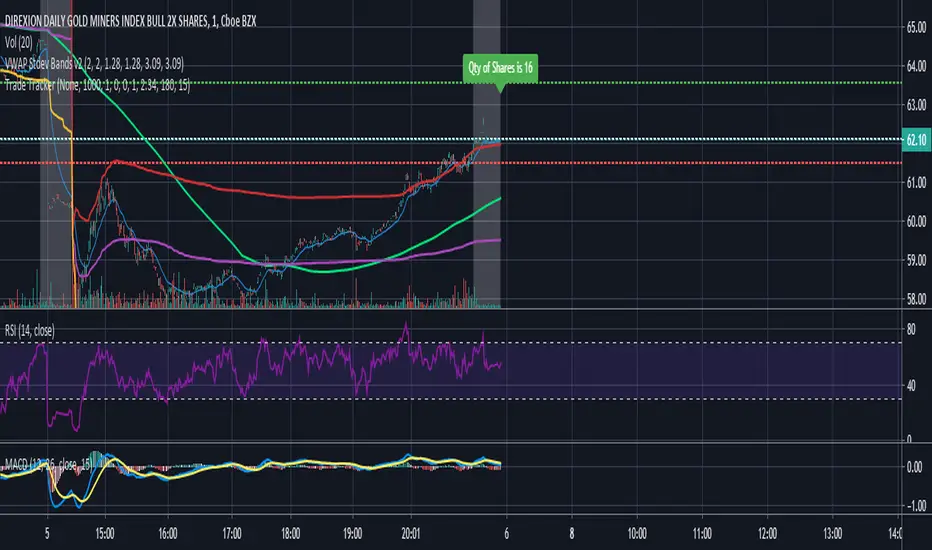
Trade Tracker - Real time stop loss and take profitTrade Tracker;
Key features
- Real time tracking of stop loss
- Real time tracking of Take Profit
- Real time tracking of break even point
- SMA integration
- EMA integration
Break even point calculated by doubling the single fee cost and adding stamp duty percentage.
Stop loss calculated by the customized percentage.
Take Profit calculated by the customized percentage.
Visually see how many shares you can buy. In the settings tab add your account balance. E.G 1000. You can then also add a portion size if you only want to trade with half your account. For this simply add 2 in the portion field. Alternatively add any multiplier you like.
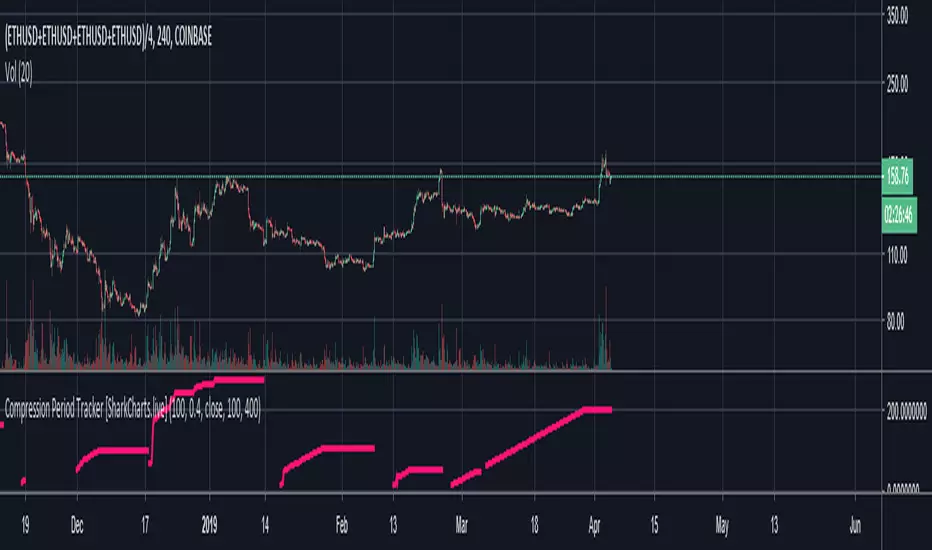
Compression Period Tracker [acatwithcharts]Compression Period Tracker is the companion script to Compression MA to read out the period length that is actually being tracked. It is analogous to Mean Reversion Period Tracker, and makes sense to use in the same indicator window when using the two sets of indicators together on the same chart.
My volatility indicators are available by subscription in several packages through SharkCharts.live - and this is planned to be the first new one ready to add. I plan to release a video explaining how to use this indicator coinciding with launch, as there's a lot to talk about. Videos on my other indicators are currently hosted on DadShark's YouTube channel.
Current pricing and subscription details will be kept up-to-date on SharkCharts.live
Goal Setting Strategies Viprasol# 🎯 Goal Setting Strategies Viprasol
A powerful goal tracking tool designed for disciplined traders who want to monitor their trading objectives, milestones, and progress directly on their charts.
## ✨ KEY FEATURES
### 📊 Flexible Goal Management
- Track anywhere from 1 to 20 trading goals simultaneously
- Adjustable goal count via simple input slider
- Each goal has its own unique emoji identifier
- Real-time progress counter
### ✅ Visual Tracking System
- Interactive checkbox system for goal completion
- Clear visual indicators (✅ completed, ⬜️ pending)
- Customizable goal names and descriptions
- Dynamic progress display
### 🎨 Full Customization
- **4 Position Options**: Top Left, Top Right, Bottom Left, Bottom Right
- **5 Font Sizes**: Tiny, Small, Normal, Large, Huge (optimized for all screen sizes)
- **Custom Colors**: Header, labels, background, achievement text
- **Premium Styling**: Modern cyber-themed design with professional appearance
### 💡 Perfect For:
- Daily/Weekly trading goal tracking
- Risk management milestones
- Profit target monitoring
- Trading plan compliance
- Personal development objectives
- Learning milestones
## 🔧 HOW TO USE
1. **Set Your Primary Goal**: Enter your main objective in "Primary Goal" field
2. **Choose Goal Count**: Select how many goals you want (1-20)
3. **Name Your Goals**: Customize each goal name in the "Goal Definitions" section
4. **Track Progress**: Check off goals as you complete them
5. **Customize Display**: Adjust colors, sizes, and position to match your chart setup
## 📐 INPUT GROUPS
### 🎯 Viprasol Goal Configuration
- Primary Goal Name
- Number of Goals (1-20)
### 📋 Goal Definitions
- All 20 goals with individual names and checkboxes
- Only enabled goals (based on count) will display
### 🌈 Premium Styling
- Goal Header Color
- Label Color
- Panel Background Color
- Achievement Color
- Header Font Size
- Milestone Font Size (Tiny/Small optimized for space)
### 📍 Elite Display
- Dashboard Position selector
## 💎 UNIQUE FEATURES
- **Space Efficient**: Tiny and Small font options for compact displays
- **Scalable**: Grow from 1 goal to 20 as your needs evolve
- **Non-Intrusive**: Overlay indicator that doesn't interfere with price action
- **Professional Design**: Clean, modern interface with cyber aesthetic
## 🎓 USE CASES
**Day Traders**: Track daily profit targets, trade count limits, max loss thresholds
**Swing Traders**: Monitor weekly/monthly goals, position management rules
**New Traders**: Learning milestones, strategy development checkpoints
**Experienced Traders**: Advanced risk management, portfolio objectives
## ⚙️ TECHNICAL DETAILS
- Version: Pine Script v5
- Type: Overlay Indicator
- Max Labels: 500
- Table-based display system
- No repainting
- Lightweight performance
## 🚀 GETTING STARTED
1. Add indicator to your chart
2. Set "Number of Goals" to your desired count (start small, scale up)
3. Customize goal names
4. Check boxes as you achieve goals
5. Watch your progress build!
## 📊 DISPLAY OPTIMIZATION
- Use "Tiny" or "Small" for maximum goals on small screens
- Use "Normal" or "Large" for standard monitors
- Use "Huge" for presentation or large displays
- Adjust position to avoid chart overlap
## 🎯 TRADING DISCIPLINE
This tool helps reinforce:
- Goal-oriented trading mindset
- Progress tracking accountability
- Milestone celebration
- Structured approach to trading development
---
**© viprasol**
*Designed for traders who take their goals seriously.*

CE-PE Options Price Tracker - Call, Put, PCR, Calendar SpreadThis advanced TradingView indicator provides a real-time, side-by-side visualization of both Call and Put option price action for Indian derivatives—including Nifty
, BankNifty
, Sensex
, and major commodities.
Designed for active option traders, it simplifies scanning for directional bias, volatility, and premium flows at any user-selected strike.
Key Features:
Dual Option Candle Visualization: Instantly visualize both Call and Put prices as candlesticks for any selected strike—compare price action, structure, and momentum with clarity.
Premium Differential Tracking (C-P Diff): Analyze market skew and sentiment with live premium difference between Call and Put options.
Put-Call Ratio (PCR) Widget: Real-time PCR analysis and signal (Bullish/Bearish/Neutral) with custom threshold levels, helping you track sentiment shifts and trading triggers.
Calendar Spread Analysis: Easily spot arbitrage and hedging opportunities between near and next expiry dates for both Call and Put—coloured expansion/contraction signals keep you focused on volatility premium flows.
Volatility Panel: Live volatility calculation on both calls and puts, along with Buy/Sell signals to alert you of trend or momentum shifts based purely on option volatility.
User-Friendly Controls: Pick underlying, strike, expiry (including next expiry) and custom colour themes in seconds.
Visual Alerts: Candle and shape signals for key option price trend events and PCR reversals.
How to Use:
Apply this indicator to any Indian index or commodity options chart on TradingView.
Select the underlying, expiry, and strike to monitor.
All signals and premium data update in real time—supporting scalping, swing, or statistical strategies.
Best Suited For:
Directional option traders
Arbitrage and calendar spread specialists
PCR sentiment and volatility signal followers
Active intraday and expiry scalpers
Anyone wanting a fast options dashboard with intuitive dashboard-style visuals
Note:
This tool is designed for study and analysis only. Options trading involves significant risk.
Always combine technical analysis with risk management and consult a financial advisor if needed.

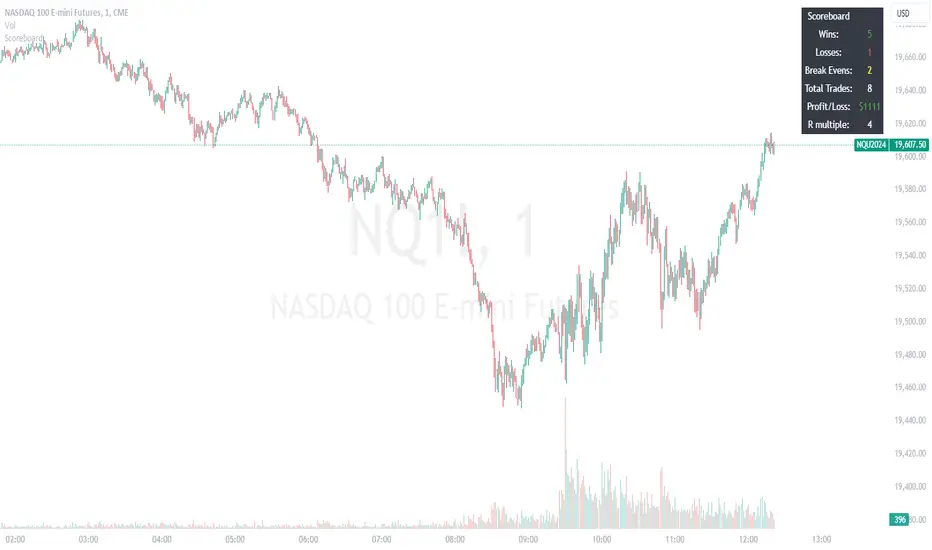
Trade ScoreboardManually track your trade record and display your results in a handy table. Good for backtesting and for making a manual ritual out of tracking your trades. This way you are less likely to overtrade during your session. This can also nice as an addendum to your charts, to show off your results and record them for later review.
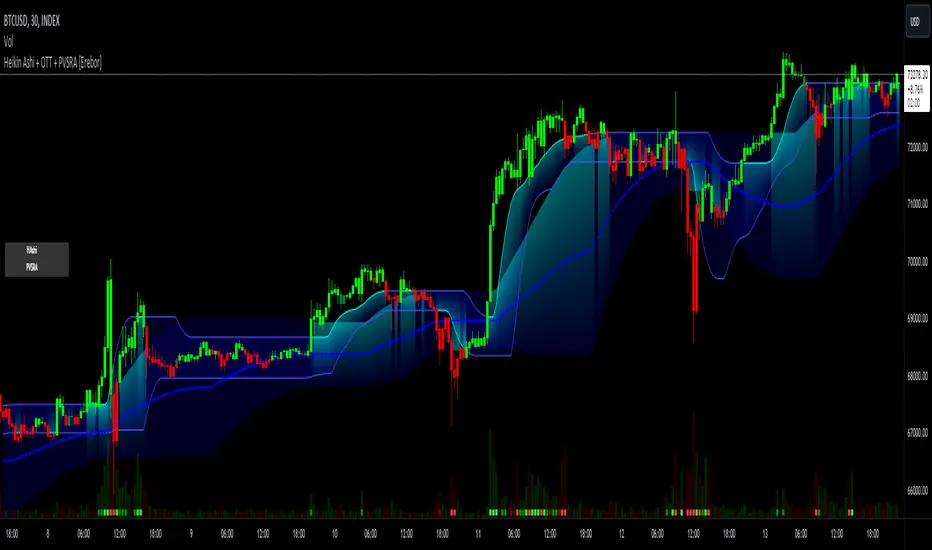
Heikin Ashi and Optimized Trend Tracker and PVSRA [Erebor]Heikin Ashi Candles
Let's consider a modification to the traditional “Heikin Ashi Candles” where we introduce a new parameter: the period of calculation. The traditional HA candles are derived from the open , high low , and close prices of the underlying asset.
Now, let's introduce a new parameter, period, which will determine how many periods are considered in the calculation of the HA candles. This period parameter will affect the smoothing and responsiveness of the resulting candles.
In this modification, instead of considering just the current period, we're averaging or aggregating the prices over a specified number of periods . This will result in candles that reflect a longer-term trend or sentiment, depending on the chosen period value.
For example, if period is set to 1, it would essentially be the same as traditional Heikin Ashi candles. However, if period is set to a higher value, say 5, each candle will represent the average price movement over the last 5 periods, providing a smoother representation of the trend but potentially with delayed signals compared to lower period values.
Traders can adjust the period parameter based on their trading style, the timeframe they're analyzing, and the level of smoothing or responsiveness they prefer in their candlestick patterns.
Optimized Trend Tracker
The "Optimized Trend Tracker" is a proprietary trading indicator developed by TradingView user ANIL ÖZEKŞİ. It is designed to identify and track trends in financial markets efficiently. The indicator attempts to smooth out price fluctuations and provide clear signals for trend direction.
The Optimized Trend Tracker uses a combination of moving averages and adaptive filters to detect trends. It aims to reduce lag and noise typically associated with traditional moving averages, thereby providing more timely and accurate signals.
Some of the key features and applications of the OTT include:
• Trend Identification: The indicator helps traders identify the direction of the prevailing trend in a market. It distinguishes between uptrends, downtrends, and sideways consolidations.
• Entry and Exit Signals: The OTT generates buy and sell signals based on crossovers and direction changes of the trend. Traders can use these signals to time their entries and exits in the market.
• Trend Strength: It also provides insights into the strength of the trend by analyzing the slope and momentum of price movements. This information can help traders assess the conviction behind the trend and adjust their trading strategies accordingly.
• Filter Noise: By employing adaptive filters, the indicator aims to filter out market noise and false signals, thereby enhancing the reliability of trend identification.
• Customization: Traders can customize the parameters of the OTT to suit their specific trading preferences and market conditions. This flexibility allows for adaptation to different timeframes and asset classes.
Overall, the OTT can be a valuable tool for traders seeking to capitalize on trending market conditions while minimizing false signals and noise. However, like any trading indicator, it is essential to combine its signals with other forms of analysis and risk management strategies for optimal results. Additionally, traders should thoroughly back-test the indicator and practice using it in a demo environment before applying it to live trading.
PVSRA (Price, Volume, S&R Analysis)
“PVSRA” (Price, Volume, S&R Analysis) is a trading methodology and indicator that combines the analysis of price action, volume, and support/resistance levels to identify potential trading opportunities in financial markets. It is based on the idea that price movements are influenced by the interplay between supply and demand, and analyzing these factors together can provide valuable insights into market dynamics.
Here's a breakdown of the components of PVSRA:
• Price Action Analysis: PVSRA focuses on analyzing price movements and patterns on price charts, such as candlestick patterns, trendlines, chart patterns (like head and shoulders, triangles, etc.), and other price-based indicators. Traders using PVSRA pay close attention to how price behaves at key support and resistance levels and look for patterns that indicate potential shifts in market sentiment.
• Volume Analysis: Volume is an essential component of PVSRA. Traders monitor changes in trading volume to gauge the strength or weakness of price movements. An increase in volume during a price move suggests strong participation and conviction from market participants, reinforcing the validity of the price action. Conversely, low volume during price moves may indicate lack of conviction and potential reversals.
• Support and Resistance (S&R) Analysis: PVSRA incorporates the identification and analysis of support and resistance levels on price charts. Support levels represent areas where buying interest is expected to be strong enough to prevent further price declines, while resistance levels represent areas where selling interest may prevent further price advances. These levels are often identified using historical price data, trendlines, moving averages, pivot points, and other technical analysis tools.
The PVSRA methodology combines these three elements to generate trading signals and make trading decisions. Traders using PVSRA typically look for confluence between price action, volume, and support/resistance levels to confirm trade entries and exits. For example, a bullish reversal signal may be considered stronger if it occurs at a significant support level with increasing volume.
It's important to note that PVSRA is more of a trading approach or methodology rather than a specific indicator with predefined rules. Traders may customize their analysis based on their preferences and trading style, incorporating additional technical indicators or filters as needed. As with any trading strategy, risk management and proper trade execution are essential components of successful trading with PVSRA.
The following types of moving average have been included: "SMA", "EMA", "SMMA (RMA)", "WMA", "VWMA", "HMA", "KAMA", "LSMA", "TRAMA", "VAR", "DEMA", "ZLEMA", "TSF", "WWMA". Thanks to the authors.
Thank you for your indicator “Optimized Trend Tracker”. © kivancozbilgic
Thank you for your indicator “PVSRA Volume Suite”. © creengrack
Thank you for your programming language, indicators and strategies. © TradingView
Kind regards.
© Erebor_GIT
Portfolio Tracker For Stocks & CryptoThis is a portfolio tracker that will track individual, overall and daily profit/loss for up to 12 assets. You can set the size of your buys and price of your buys for accurate, up to date profit and loss data right on your chart. It works on all markets and timeframes.
HOW TO USE
Go into the indicator settings and you will see all of the available settings. The first is the ability to turn the tracker info table on or off from the chart, so it saves your portfolio info but let’s you remove it from the chart while trading. Second is the option to move the position of the info table to suit your preference.
Next we get into setting up your portfolio tickers, order size and price. Each ticker lets you set which stock/crypto you bought, then set how much you purchased and then what price you purchased them at.
Go through and set up all of your assets and then turn off any tickers that you don’t need. Once that is all done, your portfolio will be shown on the chart with all the data.
FEATURES
Top Section
The portfolio tracker has 2 sections. The top section shows each ticker in your portfolio individually with the following data:
- Ticker Name
- Weight of that asset compared to your total portfolio in %
- Current value of that position in $
- Profit or loss value from purchase price in %
- Todays change in value from yesterday’s close in %
The $ Value, PnL % and Today % will all change colors from green to red depending if they are in profit or not.
Bottom Section
The bottom section of the tracker will give you info for your portfolio as a whole. It has the following data:
- Total cost of your entire portfolio in $
- Current value of your entire portfolio in $
- Current profit or loss of your entire portfolio in $
- Current profit or loss of your entire portfolio in %
- Todays change of your entire portfolio value compared to yesterday’s close in %
The $ Value, PnL $, PnL % and Today % will all change colors from green to red depending if they are in profit or not.

SL Hunter Tracker SL Hunter Tracker
coded by Bogdan Vaida
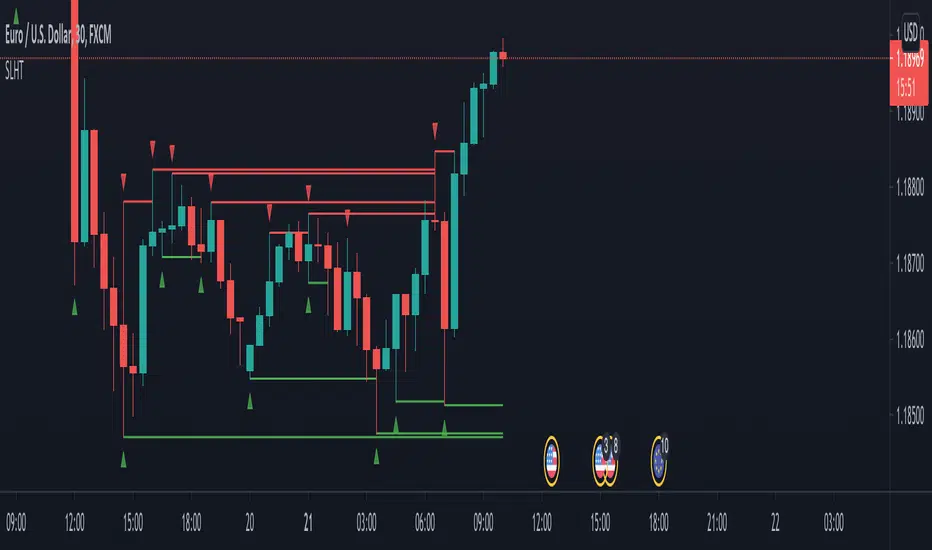
SL Hunter Tracker is a meticulous hunter that tracks SL hunters.
First it plots the fractals on the chart, then it draws lines from them
to the last wick that touched that height. You can add sweep alerts, once
per bar close, so that you get notified when a wick was touched.
Tested on: EURUSD 30'
Trend tracking strategy of proprietary traders-RabbitThis is my latest strategy integration. It is a combination of trend tracking strategy and visualization trend. I believe it will bring you a clear trend discrimination and relatively reliable trading signal hints.
(Note: This strategy parameter has special parameter debugging and Optimization for BTC1h/BIANACE Heikin-ashi chart. It works best here. Other trade pairs or parameter versions of investment targets will be published specially if necessary.)
Statement of strategy concept:
The concept of strategy is trend tracking. The formation and continuation of trend is the product of speculation market for thousands of years. There are various strategies including CTA trend strategy, shock regression strategy, grid strategy, Martin strategy, Alpha strategy and so on. These strategies have their own merits just like different schools of Chinese knight-errant. Choose one, a master is not able to do hundreds of tricks, but to practice one trick thousands of times.
Every strategy has its own right and wrong. Trading is not violence, but a process of advancing, retreating, and making profits steadily. Therefore, the use of trend tracking strategy must overcome greed in human nature, profit and loss homology, dare to bear the shock of withdrawal in order to make a big profit when the real trend arrives. (Of course, this strategy has largely avoided filtering shocks, which will be explained later.)
Policy-building instructions:
Any trend tracking strategy can produce good results when there is a trend, so judging whether a trend strategy is good or bad depends on its withdrawal performance when it is shaking. This CTA trend tracking strategy uses Kauffman adaptive algorithm, fractal adaptive dimension, self-research algorithm and other tools, and has largely avoided filtering the signal in the shock without delay to follow the trend.
New version of the note:
The latest version adds the trend drawing of negativity, which can clearly distinguish the rising or falling or oscillating trend. However, the algorithm of strategy signal has no direct relationship with trend color. Trend color helps you to distinguish trend, and point signal helps you to refer to trade. This strategy is only a simple trading signal, risk control, warehouse management also need manual operation.
(Note: This strategy parameter has special parameter debugging and Optimization for BTC1h/BIANACE Heikin-ashi chart. It works best here. Other trade pairs or parameter versions of investment targets will be published specially if necessary.)
Good luck to all of you and a smooth deal.~
