OPEN-SOURCE SCRIPT
Atualizado Hx 9 Moving Averages
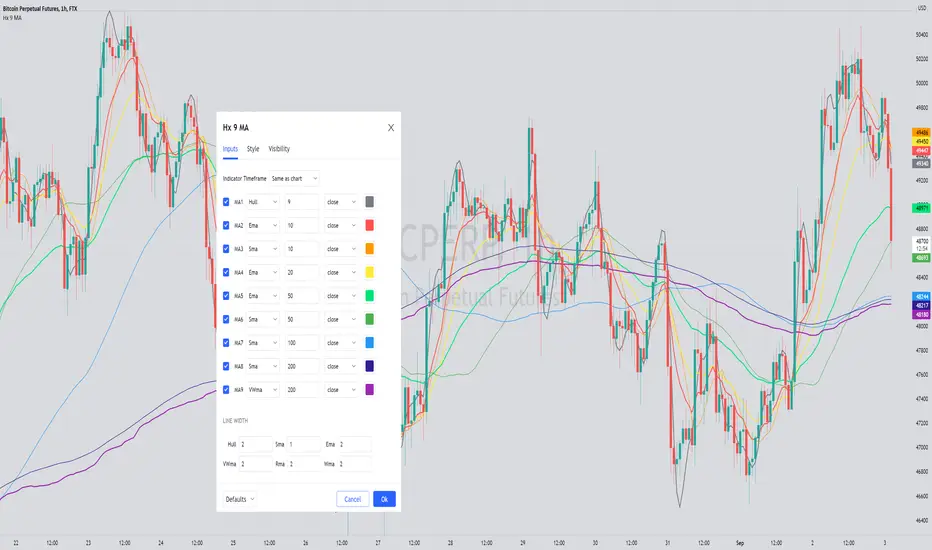
This script is designed to handle and provide quick and easy access to up to 9 different moving averages in one indicator and one tab.
Basically, it leverages the 'inline' and 'group' arguments of the 'input' function to provide you with a simple and straightforward way to:
- define your favorite moving averages by choosing type, length, source and color in the same tab and
- decide which moving averages to display in one click on a checkbox.
I do not like to have to select the color of an indicator in another tab. So, I put everything in the Inputs tab.
In addition, I like to "linewidth code" my moving averages so that a sma has a different thickness than an ema for example.
To do so, just define the line width that you want to associate with a moving average type in the "LINE WIDTH" section.
Once parameters are set to your liking, just check / uncheck the moving averages you want to display / hide (and save your settings as default).
This script handles 9 different moving averages and implements sma, wma, ema, vwma, rma (RSI) and hma (Hull).
It can easily be modified to change the number of available moving averages or include other types of moving averages.
The default settings provide an example of commonly used moving averages with associated colors ranked from Hot (more nervous) to Cold (less nervous) with the exception of Hull moving average displayed in gray.
These settings are just an example and are NOT meant to be used as a trading system! DYOR!
Hope it will be useful.
Enjoy and please let me know what you think in the comments.
Basically, it leverages the 'inline' and 'group' arguments of the 'input' function to provide you with a simple and straightforward way to:
- define your favorite moving averages by choosing type, length, source and color in the same tab and
- decide which moving averages to display in one click on a checkbox.
I do not like to have to select the color of an indicator in another tab. So, I put everything in the Inputs tab.
In addition, I like to "linewidth code" my moving averages so that a sma has a different thickness than an ema for example.
To do so, just define the line width that you want to associate with a moving average type in the "LINE WIDTH" section.
Once parameters are set to your liking, just check / uncheck the moving averages you want to display / hide (and save your settings as default).
This script handles 9 different moving averages and implements sma, wma, ema, vwma, rma (RSI) and hma (Hull).
It can easily be modified to change the number of available moving averages or include other types of moving averages.
The default settings provide an example of commonly used moving averages with associated colors ranked from Hot (more nervous) to Cold (less nervous) with the exception of Hull moving average displayed in gray.
These settings are just an example and are NOT meant to be used as a trading system! DYOR!
Hope it will be useful.
Enjoy and please let me know what you think in the comments.
Notas de Lançamento
version=5 updateAdded smma (Smoothed moving average)
Script de código aberto
Em verdadeiro espírito do TradingView, o criador deste script o tornou de código aberto, para que os traders possam revisar e verificar sua funcionalidade. Parabéns ao autor! Embora você possa usá-lo gratuitamente, lembre-se de que a republicação do código está sujeita às nossas Regras da Casa.

Aviso legal
As informações e publicações não se destinam a ser, e não constituem, conselhos ou recomendações financeiras, de investimento, comerciais ou de outro tipo fornecidos ou endossados pela TradingView. Leia mais nos Termos de Uso.
Script de código aberto
Em verdadeiro espírito do TradingView, o criador deste script o tornou de código aberto, para que os traders possam revisar e verificar sua funcionalidade. Parabéns ao autor! Embora você possa usá-lo gratuitamente, lembre-se de que a republicação do código está sujeita às nossas Regras da Casa.
Aviso legal
As informações e publicações não se destinam a ser, e não constituem, conselhos ou recomendações financeiras, de investimento, comerciais ou de outro tipo fornecidos ou endossados pela TradingView. Leia mais nos Termos de Uso.