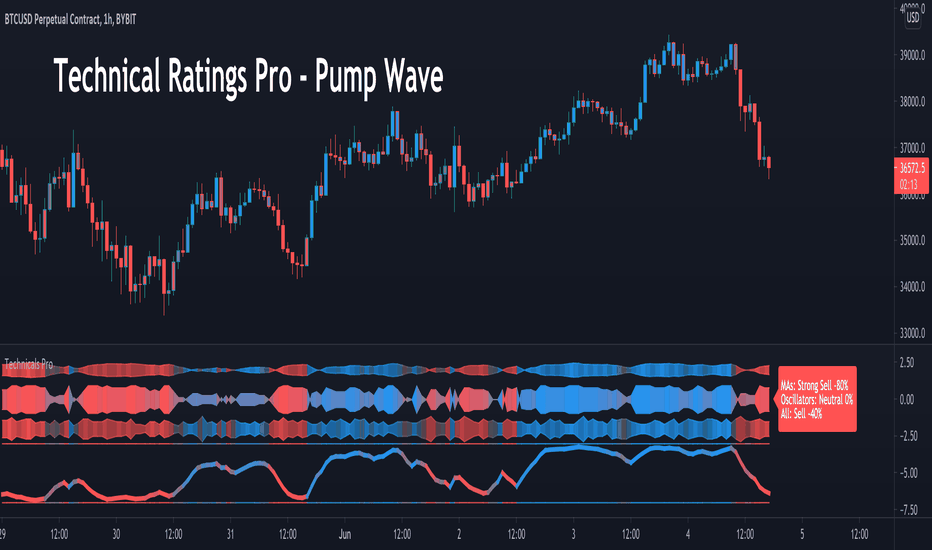
Quant Edge Ribbon PRO🟦 Quant Edge Ribbon PRO is a multi-kernel divergence ribbon indicator built on the KernelLens Nadaraya–Watson regression library (a_jabbaroff/KernelLens/1). A primary kernel and eleven longer-bandwidth kernels form a dual-ribbon visualization driven by kernel regression mathematics, an integer trend score in , a theme-aware rendering pipeline, four user-configurable reference levels, and a PRO dashboard. All twelve kernels route through the unified library dispatcher, so the user may select any of the eight kernel families and any of the three filter modes from a single configuration panel.
🟦 HOW IT WORKS
Quant Edge Ribbon PRO calls the KernelLens library's unified dispatcher (`kl.estimate`) twelve times per bar — once for the primary kernel and once for each of the eleven outer kernels:
```
primary = kl.estimate(type, src, ℓ, α, period, phase, filter)
long00 = kl.estimate(type, src, ℓ + 1·s, α, period, phase, filter)
long01 = kl.estimate(type, src, ℓ + 2·s, α, period, phase, filter)
...
long10 = kl.estimate(type, src, ℓ + 11·s, α, period, phase, filter)
```
where ℓ is the Primary Bandwidth and s is the Bandwidth Step. All twelve kernels share the same kernel type, filter, shape α, period, and phase — only the bandwidth differs. This guarantees the ribbon behaves as a coherent spectrum of kernel scales rather than a mixture of unrelated signals.
The library handles all weighted-sum computation, loop-depth selection, NA-safe iteration, division-by-zero guards, and input validation internally. Quant Edge Ribbon PRO does not reimplement any kernel math — every bug fix or optimization in the library automatically propagates to this indicator.
🟦 KERNEL LIBRARY INTEGRATION
Quant Edge Ribbon PRO imports the published KernelLens library and uses the following export:
| Library Export | Used For |
|---|---|
| `kl.estimate()` | Unified dispatcher — routes to the correct kernel based on the user's Kernel Type dropdown. Called twelve times per bar, once for the primary kernel and once for each of the eleven outer kernels. |
Every regression computation — kernel weight evaluation, NA-safe summation, bandwidth-aware loop termination — is delegated to the library. The indicator itself contains zero kernel math; it only orchestrates twelve library calls and aggregates their outputs into the trend score.
🟦 THE TWELVE-KERNEL RIBBON ARCHITECTURE
**Primary kernel (the shortest, the anchor)** — A single kernel at bandwidth ℓ that serves two roles: (1) it is the reference baseline for the trend score calculation, and (2) it is plotted as a dedicated highlighted anchor line when the "Highlight Primary Kernel" toggle is ON.
**Eleven outer kernels (progressively wider)** — Kernels at bandwidths ℓ+1·s, ℓ+2·s, …, ℓ+11·s, where s is the Bandwidth Step (default: 1). Each outer kernel is plotted as a line on the main chart, all eleven sharing a single score-driven gradient color — so the entire outer ribbon shifts between the theme's bull and bear hues as the trend score moves between −11 and +11.
**Eleven inner ribbon plots (lagged primary snapshots)** — The primary kernel plotted at eleven time-lag offsets (0, 1, 2, …, 10 bars). The resulting visual is a gently flowing shadow that makes expansion and contraction of the outer ribbon easier to perceive. Opacity is user-controlled (default: 40 %).
🟦 INTEGER TREND SCORE
The trend score is a signed integer in , computed on every bar by eleven pairwise comparisons between the primary kernel (at progressive lag offsets) and the eleven outer kernels:
```
score = 0
for i in 0..10:
if primary < long_i:
score += 1
else:
score -= 1
```
**Semantic interpretation** — Each comparison pairs an older snapshot of the shortest kernel against a current snapshot of a progressively wider kernel. In an uptrend, past primary values are lower while current wider-kernel values have caught up above them — the inequality resolves positive on most pairs and the score climbs toward +11. The symmetric argument drives the score toward −11 in a downtrend.
**Score parity** — Because the score is a sum of eleven ±1 terms (score = 2k − 11, k ∈ ), it is always odd. Reachable values: { −11, −9, −7, −5, −3, −1, 1, 3, 5, 7, 9, 11 }. The score is never exactly zero.
🟦 STRENGTH CATEGORIZATION
The absolute score is bucketed into four bands, each with a matched label glyph used throughout the dashboard and the last-bar signal label:
| Score Range | Strength | Label |
|---|---|---|
| \|score\| = 1 | NEUTRAL | ▰▱▱▱ NEUTRAL |
| \|score\| ∈ {3, 5} | WEAK | ▰▰▱▱ WEAK BULL / WEAK BEAR |
| \|score\| = 7 | STRONG | ▰▰▰▱ STRONG BULL / STRONG BEAR |
| \|score\| ∈ {9, 11} | TRIPLE | ▰▰▰▰ TRIPLE BULL / TRIPLE BEAR |
The bull / bear suffix is driven by the sign of the score. The progress-bar glyphs (▰▱) give an instant at-a-glance read of confluence intensity without needing to parse the numeric value.
🟦 NON-REPAINTING BEHAVIOR
Quant Edge Ribbon PRO inherits non-repainting behavior directly from the KernelLens library's `_phase` parameter. A single Phase input (default: 2) shifts every one of the twelve kernel centers into the past by that many bars.
- Phase = 0 — live estimate, flickers on the current bar (real-time only; history is immutable)
- Phase = 1 — 1-bar lag, non-repainting once the bar is confirmed
- Phase = 2 — recommended balance between freshness and stability (default)
- Phase = 3+ — extra margin against erratic ticks, higher lag
Historical repainting never occurs at any phase value. The library contains no `request.security` calls, no lookahead, and no array rotation that could leak future data. Every historical bar's plotted value is final once confirmed.
🟦 VISUAL PIPELINE
**Outer Ribbon Gradient** — All eleven outer kernels are plotted with a single shared color driven by the trend score via `color.from_gradient(score, -11, 11, thBear, thBull)`. As the score walks across its range, the entire ribbon shifts continuously between the active theme's bearish and bullish hues — producing a smooth visual feedback loop between the math and the palette.
**Inner Ribbon Shadow Trail** — Eleven lag-shifted primary snapshots (primary through primary ) drawn in the theme's accent hue with user-controlled opacity. On a trending chart the trail visually expands; on a reversing chart it contracts. Adjust opacity from 0 (invisible) to 100 (fully opaque) — default 40 balances presence and subtlety.
**Primary Kernel Anchor Line** — The primary kernel plotted as a dedicated bold line in the theme's accent color at 80 % opacity, distinct from the shadow trail. Provides a clear centerline amid the ribbon flow. Toggleable.
**Oscillator Subplot** — The smoothed trend score plotted in a dedicated subplot with a score-gradient vertical fill between the score line and the zero line. Opacity is user-controlled. An optional bold score line (up to 4 px wide) overlays the fill for sharp numeric reading.
**Last-Bar Trend Label** — A right-anchored label at the current bar in the oscillator pane. Format: `▲ TRIPLE BULL 11 / 11` (bull) or `▼ WEAK BEAR −3 / 11` (bear). The label is deleted and redrawn on every bar, so only one instance is ever present on the chart.
🟦 OSCILLATOR STYLES
The oscillator subplot ships with two visual presets, selectable from the Oscillator Style dropdown:
| Style | Plot Style | Fill | Best For |
|---|---|---|---|
| Classic Gradient | `plot.style_line` (smooth curve) | Continuous vertical gradient from score to zero | Trend flow, slope momentum |
| Stepline | `plot.style_stepline` (staircase) | Stepped gradient mirroring the discrete score plateaus | Signal / threshold trading, discrete level crossings |
**Classic Gradient** produces a smooth curve traced through the smoothed score values, with the gradient fill flowing continuously between the score line and the zero line. This is the default and suits traders who read trend direction through slope and curvature.
**Stepline** renders each bar as a horizontal plateau joined to the next bar by a vertical edge. Because the raw score is always an odd integer in { −11, −9, …, 9, 11 }, the staircase visualization honors the score's true discrete nature — making it easier to identify exact threshold crossings (e.g. the moment the score enters the ±9 extreme zone). The fill inherits the same stepline style, so the entire oscillator pane stays geometrically consistent.
Both styles share the same opacity controls, score line toggle, and line width setting — only the geometry of the score line and its fill changes between them.
🟦 THEME SYSTEM
Ten cohesive color palettes tuned to the Quant Edge Ribbon PRO optical brand. One selection drives every visual component — outer ribbon gradient, inner ribbon accent, oscillator fill, reference lines, signal label, dashboard accents — all sharing the same bull / bear / accent color axes:
| Theme | Bull | Bear |
|---|---|---|
| Prism | Forest green | Crimson red |
| Focus | Cyan steel | Deep orange |
| Solar | Warm amber | Indigo red |
| Frost | Sky blue | Soft lavender |
| Laser | Neon lime | Hot crimson |
| Aurora | Bright gold | Scarlet |
| Plasma | Electric aqua | Magenta |
| Bloom | Mint green | Hot pink |
| Eclipse | Deep navy | Dark crimson |
| Carbon | Near-black | Silver grey |
The oscillator's zero line uses Pine's `chart.fg_color` so it auto-adapts to the actual chart background (white on dark charts, black on light charts) — independent of the Dashboard's Display Mode setting.
🟦 REFERENCE LEVELS
Four user-configurable horizontal reference lines mark the score's structural thresholds inside the oscillator subplot:
| Level | Style | Meaning |
|---|---|---|
| +11 / −11 | Dotted | Ceiling / floor — the mathematical maximum (every comparison aligned) |
| +9 / −9 | Dashed | Extreme zone — nine or more of the eleven comparisons agree on direction |
Each pair (±11 and ±9) has an independent opacity input (0–100 %). A master toggle (Show Reference Levels) collapses all four lines to fully transparent in a single branch — useful for minimalist layouts. An additional `showOsc` gate hides them automatically when the oscillator itself is disabled.
🟦 PRO DASHBOARD
A 2-column, 12-row theme-aware status panel that updates only on the last bar (zero historical overhead). Supports Dark and Light display modes, six docking positions, and four text sizes. Renders via `force_overlay = true` on the main price chart.
| Row | Label | Content |
|---|---|---|
| Header | Q-EDGE PRO | DARK / LIGHT |
| Theme | Theme | Active palette name |
| Kernel | Kernel | Selected kernel type |
| Divider | RIBBON | — |
| Primary ℓ | Primary ℓ | Primary bandwidth value |
| Span | Span | ℓ → ℓ + 11·s |
| Filter | Filter | No Filter / Smooth / Zero Lag |
| Divider | SCORE | — |
| Score | Score | ▲/▼ + integer score + " / 11" (bull/bear colored) |
| Bull / Bear | Bull / Bear | Bull comparison count / bear comparison count |
| Strength | Strength | ▰-bar + NEUTRAL / WEAK / STRONG / TRIPLE label |
| Primary | Primary | Primary kernel value in chart mintick format |
**Bull / Bear breakdown** — The eleven pairwise comparisons split into bulls (resolved +1) and bears (resolved −1). Always sums to 11, so this row gives a direct visual of how many kernel scales agree with the net direction.
🟦 ALERT CONDITIONS
Six opt-in alert conditions, each gated by its own toggle:
| Alert | Fires When |
|---|---|
| Bullish Flip | Score crosses from ≤ 0 into positive territory |
| Bearish Flip | Score crosses from ≥ 0 into negative territory |
| Extreme Bullish | Score reaches +9 or higher (first entry into the zone) |
| Extreme Bearish | Score reaches −9 or lower (first entry into the zone) |
| Full Confluence Up | Score hits +11 — every outer kernel aligned bullishly |
| Full Confluence Down | Score hits −11 — every outer kernel aligned bearishly |
All alerts use `alertcondition()` for maximum compatibility with TradingView's alert system including webhooks. Messages are structured as `"Quant Edge Ribbon PRO: "` for easy parsing in downstream automation.
🟦 RECOMMENDED PRESETS
| Style | Primary ℓ | Bandwidth Step s | Phase | Filter | Chart |
|---|---|---|---|---|---|
| Scalper | 8–16 | 1 | 1 | No Filter | 1m–5m |
| Day Trader | 16–32 | 1–2 | 2 | Smooth | 15m–1h |
| Swing | 25–50 | 1–2 | 2 | Smooth | 4h–1D |
| Position | 50–120 | 2–3 | 3 | Smooth | 1D–1W |
**Bandwidth Step tuning** — Step = 1 produces a tight ribbon where adjacent outer kernels sit visually close together. Steps of 2–4 spread the eleven outer kernels across a broader spectrum of scales, making expansion / contraction easier to read at a glance. Step 5–6 is reserved for very wide ribbons where each line represents a distinctly different time scale.
🟦 COMPATIBILITY
- Pine Script v6
- All exchanges, all asset classes (crypto, forex, equities, commodities, indices)
- All timeframes (1 minute through Monthly)
- Both Dark and Light chart themes — visual elements auto-adapt via `chart.fg_color`
- No exchange-specific logic — fully deterministic
🟦 TECHNICAL NOTES
- **Library dependency** — `import a_jabbaroff/KernelLens/1` — all kernel regression math is delegated to the published library
- **Plot budget** — 11 outer + 11 inner + 1 primary + 2 oscillator plots + 1 fill + 4 hlines = well under Pine's 64-plot limit
- **Table** — Single `var table` created once on `barstate.islast` with `force_overlay = true`; dashboard renders on the main chart pane, zero historical overhead
- **No persistent drawing objects** — no `box.new`, `line.new`, no `array.new`; the single trend label is deleted and recreated every bar so only one instance is ever present
- **Opacity convention** — every user-facing opacity input follows `0 = invisible, 100 = fully opaque`; conversion to Pine's native transparency is centralized in a single helper function (`f_opac`)
- **Non-repainting** — inherits from the library's `_phase` parameter; no `request.security`, no lookahead, no future-bar leakage at any phase value
- **Chart background adaptive** — the oscillator's zero line uses `chart.fg_color`, so it always renders with high contrast regardless of the user's chart color scheme
🟦 DISCLAIMER
Quant Edge Ribbon PRO is a technical analysis indicator built on the KernelLens Nadaraya–Watson regression library. It is provided solely for educational and research purposes and does not constitute financial, investment, or trading advice.
Kernel regression is a local smoothing technique. It estimates the mean of a source series in the neighborhood of the current bar based on historical data, but it does not predict future prices, does not generate trading signals on its own, and does not guarantee the profitability of any strategy built on top of its output. The integer trend score is a geometric summary of kernel alignments — not a forecast — and should always be combined with broader context: higher-timeframe structure, volatility regime, liquidity, news, and risk management.
Past performance of any model does not guarantee future results. Markets contain systemic risks that cannot be eliminated by any amount of mathematical rigor. Responsibility for any trading decisions rests entirely with the user. Always apply sound capital management, conduct your own independent analysis, and never risk capital you are not prepared to lose.
The author assumes no liability for direct or indirect losses incurred through the use of Quant Edge Ribbon PRO or the underlying KernelLens library.
Indicador Pine Script®