Indicador Pine Script®
Oscilador de Aceleração (OA)
Trend Energy Filter
🚀 Trend Energy Filter
Introducing a new dimension in trend analysis: Trend Energy.
In automotive systems (like ECU sensor data), we use hysteresis and noise-gates to prevent "jitter" from triggering false responses.
This script applies that same logic to Momentum (Trend Energy):
ENERGY: Measures the "Engine Load" of the trend by calculating the distance from a long-term SMA.
NOISE FILTER: Uses an ATR-based threshold. The Energy value only updates if the change is significant, effectively filtering out the "market static" that causes false signals.
EXHAUSTION: Detects when the "Fuel" is running out by identifying peaks in energy and subsequent cooling.
While this type of signal processing is often hidden inside expensive commercial "black box" tools, this script provides it as a transparent, open-source engineering solution.
While standard indicators look at price in isolation, the Trend Energy Filter analyzes the "tension" between price and its long-term baseline (SMA). By focusing on the Surface Area of this tension, we gain a visual representation of market conviction that has been largely overlooked by traditional technical analysis.
The Innovation of the "Energy Surface"
Most traders view moving averages as simple static lines. The Trend Energy Filter reimagines the gap between price and the SMA as a dynamic surface.
Volumetric Visualization: Instead of thin lines, the indicator uses a neon-glow "Surface" with vertical gradients. This represents the total "Energy" currently held by the trend.
Volatility-Adjusted Noise Filter: Unlike standard oscillators that whipsaw during consolidation, this script utilizes a state-persistent ATR filter. It only updates the "Surface" when market energy moves significantly, effectively silencing the noise of minor price fluctuations.
XAUUSD 15min
Peak-Based Exhaustion Logic: By tracking the Highest energy peaks over a lookback period, the script identifies when a trend's "batteries" are running low—turning the surface blue when momentum begins to stall.
How to Trade with the Energy Surface:
1. Entering the Energy Flow (Momentum Resumption)
Watch for the "Surface" to break above its previous peak. When the color shifts from the "Exhaustion Blue" back to a vibrant Bullish Green or Bearish Red, it signals that the market has finished its rest and is ready to expand the surface area again.
NAS100 15min
Signal: Momentum Increasing alert.
2. Spotting the Blow-Off (Exhaustion Detection)
When the "Surface" is high but begins to contract (falling below its recent high), the trend is becoming "over-extended" or "exhausted." This is the ideal time to take profits or tighten trailing stops.
Visual: The surface turns blue (#5b9cf6) while still at high levels.
NAS100 15 min
3. The Squeeze (Energy Compression)
When the Energy Surface is exceptionally low and the Noise Filter prevents it from fluctuating, the market is in a "coiled spring" state. A sudden expansion of the surface from a flat baseline often precedes a massive directional breakout.
NAS100 15min
4. Baseline Context
Green Surface: Price is above the 200 SMA (Bullish Energy).
Red Surface: Price is below the 200 SMA (Bearish Energy).
Blue Surface: Trend is pausing or mean-reverting (Exhaustion).
Indicador Pine Script®
Velocity Acceleration Momentum [VAM]Velocity Acceleration Momentum
Overview
VAM is a multi-layered momentum indicator that measures how fast price is moving (Velocity), whether that speed is increasing or decreasing (Acceleration), and how strong the underlying trend is (ADX). Rather than just telling you the direction of price, VAM tells you the quality and phase of the move you're in.
How It's Calculated
Velocity measures the percentage rate of change of price over a lookback period (default: 14 bars), then smooths it with a 3-period EMA. It answers: "How fast is price moving relative to where it was?"
Acceleration is the change in Velocity over a secondary smoothing window (default: 5 bars), also EMA-smoothed. It answers: "Is momentum speeding up or slowing down?"
Signal Line is an EMA of Velocity (default: 9 bars) — similar in concept to the MACD signal line. When Velocity crosses above/below the Signal Line, it can indicate momentum shifts.
ADX Histogram uses Pine's built-in DMI/ADX calculation. When DI+ > DI−, bars plot positively (green); when DI− > DI+, bars plot negatively (red). The color opacity is gradient-mapped to ADX strength — vivid bars mean a strong trend, faded bars mean a weak/ranging market.
Reading the Velocity Line Colors (Regime Detection)
The Velocity line changes color based on the combination of Velocity and Acceleration:
ColorConditionMeaning🟢 LimeVelocity > 0, Acceleration > 0Rocket — momentum is up and accelerating🟡 YellowVelocity > 0, Acceleration < 0Topping — still positive but losing steam🔴 RedVelocity < 0, Acceleration < 0Freefall — momentum is down and worsening🟠 OrangeVelocity < 0, Acceleration > 0Bottoming — still negative but recovering
How to Trade With It
High level Buy when Velocity Line Green 🟢sell when Velocity drops hard and is Red 🔴
+
ADX BARS TELL YOU THE TREND AND THE TREND STRENTH (COMBINE THIS AND THE VELOCITY LINE)
+
ACCELERATION PUROPLE AND YELLOW WAVE TELLS YOU SHARP DROPS OR ADVANCES IN ACCELERATION
Trend Entries: Look for the Velocity line turning Lime (🟢) with the ADX histogram printing vivid green bars above the +25 line. This is the highest-confidence long setup — price is accelerating upward with confirmed trend strength.
Caution / Exit Signals: When Velocity turns Yellow (🟡) and sharply drops, momentum is fading even if price is still rising. Consider tightening stops or taking partial profits.
Short / Bearish Bias🔴 : Red Velocity + vivid red ADX bars below −25 signal a strong downtrend in Freefall. Avoid longs; look for short setups.
Potential Reversals: Orange Velocity (Bottoming) combined with ADX bars beginning to fade and shift green can be an early signal that a bottom is forming — useful for scaling into longs cautiously.
Signal Line Crosses: When the Velocity line crosses above the white Signal Line, momentum is picking up. Crosses below suggest weakening. Best used as a confirmation filter, not a standalone trigger.
The ±25 Reference Lines mark the ADX threshold commonly used to separate trending (above) from ranging (below) markets. ADX histogram bars inside the ±25 zone suggest low trend conviction — reduce position sizing or wait for confirmation.
Inputs
Source — Price input (default: Close)
Velocity Length — Lookback period for rate-of-change calculation (default: 14)
Acceleration Smooth — Smoothing window for acceleration (default: 5)
Signal Line Length — EMA period for the signal line (default: 9)
ADX Length — Period for DMI/ADX calculation (default: 14)
Show Signal Line — Toggle the white signal line on/off
Show Zone Backgrounds — Toggle ADX-strength background shading
Show ADX Histogram — Toggle the ADX directional histogram
Indicador Pine Script®
Apex Market Breadth Oscillator [Pineify]Apex Market Breadth Oscillator
The Apex Market Breadth Oscillator is a composite market-internal momentum tool that blends Advance/Decline Issue Breadth with Up/Down Volume Breadth into a single, smoothed oscillator — giving traders a unified view of how broadly the market is participating in a move. Rather than relying on price action of a single index, this indicator looks beneath the surface by measuring both the percentage of stocks advancing and the percentage of volume flowing into advancing stocks, then combining them into one reading. The oscillator is built on the Whaley Breadth Thrust methodology and incorporates Martin Zweig's classic breadth thrust threshold (61.5) as a key reference level. An EMA-smoothed composite line is paired with an SMA signal line for crossover-based timing, while gradient coloring and zone-based buy/sell signals help traders quickly identify oversold recoveries, overbought exhaustion, and rare breadth thrust events that have historically preceded major bull market advances.
Key Features
Composite breadth oscillator — merges Advance/Decline Issue Breadth (ADT) and Up/Down Volume Breadth (UDT) into a single reading that captures both stock participation and capital flow direction.
Whaley Breadth Thrust methodology — calculates the percentage of advancing issues and advancing volume relative to their totals, providing a normalized 0–100 scale for cross-market comparison.
EMA-smoothed oscillator with SMA signal line — the composite is smoothed via EMA for noise reduction while retaining responsiveness; an SMA signal line provides crossover-based momentum shift detection.
Martin Zweig's breadth thrust threshold — the 61.5 level marks the historically significant thrust zone where breadth surges have preceded powerful multi-month rallies.
Zone-based buy/sell signals — buy signals fire only in oversold territory (below 40), sell signals fire only in overbought territory (above 61.5), filtering out low-conviction crossovers in the neutral zone.
Dynamic gradient coloring — the oscillator line transitions smoothly from red (oversold) to green (overbought) based on its position between the 40 and 61.5 levels, providing an instant visual read on market health.
Breadth thrust event labels — rare "THRUST" labels mark the moment the oscillator crosses above 61.5, highlighting high-conviction bullish impulse events.
Multi-exchange support — toggle between NYSE and NASDAQ breadth data to analyze large-cap or growth/tech-weighted market internals.
How It Works
The indicator follows a four-stage calculation pipeline to transform raw market breadth data into actionable signals:
Data sourcing: Four breadth series are pulled from the selected exchange (NYSE or NASDAQ) — advancing issues, declining issues, advancing volume, and declining volume. These are standard USI (US Indices) breadth tickers that represent the internal composition of the market on each bar.
Breadth ratio calculation: Two normalized ratios are computed. The Advance/Decline Thrust (ADT) measures the percentage of advancing issues relative to total issues: ADT = 100 × advancing / (advancing + declining). The Up/Down Volume Thrust (UDT) applies the same formula to volume: UDT = 100 × up volume / (up volume + down volume). Both ratios range from 0 to 100, where 50 represents equilibrium.
Composite smoothing: ADT and UDT are averaged to create a raw composite that reflects both issue participation and volume participation. This raw composite is then smoothed with an Exponential Moving Average (EMA) of configurable length (default: 10). The EMA removes bar-to-bar noise while preserving the oscillator's ability to react quickly to genuine breadth shifts.
Signal line generation: A Simple Moving Average (SMA) of the smoothed composite (default length: 5) serves as the signal line. Crossovers between the faster EMA-smoothed composite and the slower SMA signal line identify momentum inflection points, which are then filtered by zone (oversold or overbought) to produce the final buy and sell signals.
Trading Ideas and Insights
Oversold recovery entries: When the oscillator drops below 40, the market is experiencing broad-based selling — most stocks are declining and declining volume dominates. A buy signal (composite crossing above the signal line while below 40) captures the early momentum shift as breadth begins recovering. These signals identify potential bottoms where risk/reward is most favorable.
Overbought exhaustion exits: When the oscillator rises above 61.5, the market is experiencing an exceptionally broad advance. A sell signal (composite crossing below the signal line while above 61.5) identifies the moment breadth momentum starts fading after an extreme surge. This can be used to take profits or tighten stops on long positions.
Breadth thrust confirmation: The "THRUST" label marks the rare event where the oscillator surges past 61.5. Historically, Zweig Breadth Thrusts — where breadth rapidly transitions from oversold to above the thrust threshold — have preceded significant market gains over the following 6–12 months. These events can be used as high-conviction confirmation for establishing or adding to long-term positions.
Divergence analysis: When a major index makes new highs but the Apex Breadth Oscillator fails to confirm (lower highs on the oscillator), it signals narrowing participation — fewer stocks are driving the rally. This breadth divergence is a classic warning sign of potential market weakness ahead.
Equilibrium as a trend filter: Sustained readings above 50 indicate healthy broad market participation; sustained readings below 50 suggest internal weakness even if headline indices appear stable. Use the 50 level as a simple filter — favor long setups when the oscillator is above 50, and exercise caution or favor short setups when below.
How Multiple Indicators Work Together
The Apex Market Breadth Oscillator integrates several analytical components into a cohesive system, each serving a distinct purpose:
Advance/Decline Issue Breadth (ADT) — participation measurement: ADT answers the question "what percentage of stocks are advancing?" This captures the breadth of participation regardless of the size of individual stock moves. A market where 80% of stocks are rising is fundamentally healthier than one where only 20% are rising — even if both scenarios produce the same index return.
Up/Down Volume Breadth (UDT) — capital flow measurement: UDT answers the question "what percentage of volume is flowing into advancing stocks?" This adds a volume-weighted dimension that ADT alone cannot provide. High UDT values indicate that institutional-scale capital is flowing into advancing stocks, not just a large number of small-cap stocks ticking higher on minimal volume.
EMA composite smoothing — noise reduction: Averaging ADT and UDT and applying EMA smoothing transforms two noisy daily breadth readings into a single, clean oscillator. The EMA's exponential weighting ensures recent breadth conditions have more influence than older ones, keeping the oscillator responsive to current market dynamics.
SMA signal line — timing mechanism: The SMA signal line adds a crossover-based timing layer. While the composite oscillator tells you the current state of market breadth, the signal line crossovers tell you when that state is changing — identifying the inflection points where breadth momentum is shifting from deteriorating to improving (or vice versa).
The synergy is sequential: raw breadth data (issues + volume) → normalized ratios (ADT + UDT) → blended composite → EMA smoothing → SMA signal line → zone-filtered crossover signals. Each layer refines the raw data further, producing signals that require both broad market participation AND volume confirmation AND momentum shift AND extreme positioning to trigger — a multi-filter approach that dramatically reduces false signals compared to using any single breadth measure alone.
Unique Aspects
Dual-breadth composite: Most breadth oscillators use either issue breadth or volume breadth in isolation. The Apex Market Breadth Oscillator combines both into a single composite, ensuring that signals reflect genuine broad-based market moves backed by volume — not just a large number of stocks ticking marginally higher on thin volume.
Zweig-inspired threshold levels: The 61.5 thrust level is not an arbitrary overbought line — it is derived from Martin Zweig's Breadth Thrust indicator, one of the most historically reliable bullish signals in market analysis. The 40 oversold level provides the corresponding floor, creating a framework rooted in decades of market research.
Zone-filtered signals: Rather than generating signals on every crossover (which would produce many false signals in the neutral 40–61.5 zone), the indicator restricts buy signals to oversold territory and sell signals to overbought territory. This zone-based filtering ensures signals only fire at extreme readings where the probability of a meaningful reversal is highest.
Gradient color mapping: The oscillator line uses a continuous gradient from red to green mapped to the 40–61.5 range, rather than a simple binary color switch. This provides an intuitive, at-a-glance reading of where the oscillator sits within the oversold-to-overbought spectrum without needing to check exact values.
How to Use
Add the indicator to your chart. It appears in a separate pane below the price chart, displaying the composite breadth oscillator, signal line, and three reference levels (40, 50, 61.5).
Select your preferred exchange — NYSE for large-cap/value-oriented breadth analysis, or NASDAQ for tech/growth-weighted breadth analysis. The choice depends on which market segment you are trading or want to monitor for confirmation.
Monitor the oscillator's color: red tones indicate the oscillator is near or below the oversold zone (40), suggesting broad market weakness. Green tones indicate the oscillator is near or above the overbought/thrust zone (61.5), suggesting strong broad participation.
Watch for BUY signals (green triangles at the bottom) — these appear when the oscillator crosses above its signal line while in oversold territory (below 40). Consider entering long positions or adding to existing ones.
Watch for SELL signals (red triangles at the top) — these appear when the oscillator crosses below its signal line while in overbought territory (above 61.5). Consider taking profits or tightening stops on long positions.
Pay special attention to THRUST labels (green labels at the bottom) — these mark the rare event where the oscillator surges above 61.5. Historically, these breadth thrust events have preceded significant multi-month market advances and represent high-conviction bullish confirmation.
Use the 50 equilibrium level as a simple trend filter — sustained readings above 50 indicate healthy market internals; sustained readings below 50 suggest underlying weakness.
Compare the oscillator's trajectory with the price index for divergence analysis — if the index makes new highs but the oscillator does not, breadth is narrowing and caution is warranted.
Customization
Market Exchange (default: NYSE): Selects which exchange's breadth data to use. NYSE breadth reflects large-cap, broad market participation. NASDAQ breadth is more sensitive to technology and growth stock activity. Choose based on your trading focus or use both in separate indicator instances for a complete picture.
Oscillator Smoothing (default: 10): Controls the EMA period applied to the raw composite. Lower values (e.g., 5–7) produce a more volatile, responsive oscillator that generates more signals — suitable for short-term trading. Higher values (e.g., 15–21) produce a smoother oscillator with fewer but more reliable signals — suitable for swing or position trading.
Signal Line Length (default: 5): Controls the SMA period of the signal line. Shorter values make the signal line track the oscillator more closely, triggering crossovers sooner but with more potential for whipsaws. Longer values add lag but filter out minor fluctuations, producing more deliberate crossover signals.
Conclusion
The Apex Market Breadth Oscillator provides a comprehensive, under-the-hood view of market health by combining issue breadth and volume breadth into a single composite oscillator. Rooted in the Whaley Breadth Thrust methodology and incorporating Martin Zweig's historically significant thrust threshold, the indicator goes beyond surface-level price analysis to reveal whether rallies and declines are supported by broad participation and institutional volume. Its zone-filtered buy/sell signals, gradient color mapping, and rare breadth thrust labels give traders a structured, evidence-based framework for identifying high-probability turning points and confirming the strength of market moves. Whether used as a standalone market timing tool or as a confirmation layer alongside price-based indicators, the Apex Market Breadth Oscillator delivers actionable insights into the true breadth and conviction behind market movements.
Indicador Pine Script®
Aroon | TR🎯 Overview
Aroon | TR is a versatile trend-following indicator that measures the time elapsed since price recorded its highest high and lowest low over a specified period. Developed by Tiagorocha1989, this enhanced version of Tushar Chande's classic Aroon indicator offers multiple visualization modes, customizable moving averages, and comprehensive visual features to help traders identify trend direction, trend strength, and potential reversal points with greater precision.
🔧 How It Works
The Aroon indicator consists of two lines: Aroon Up and Aroon Down. These lines measure how many periods have passed since price recorded a high or low within the lookback period. The relationship between these lines determines trend direction and strength.
Core Calculation Logic:
The indicator calculates the Aroon lines using the following logic:
Aroon Up: Measures the number of periods since the highest high within the lookback period
Formula: 100 × (Length - Periods Since Highest High) / Length
Aroon Down: Measures the number of periods since the lowest low within the lookback period
Formula: 100 × (Length - Periods Since Lowest Low) / Length
Both lines oscillate between 0 and 100, with:
Values above 50 indicating a recent high/low (strong trend)
Values approaching 100 indicating a very recent high/low (very strong trend)
Values approaching 0 indicating no recent high/low (weak or reversing trend)
The indicator also calculates Aroon as the difference between Aroon Up and Aroon Down (Aroon Up minus Aroon Down), creating an oscillator that oscillates around zero:
Positive Aroon values → Bullish momentum (Aroon Up above Aroon Down)
Negative Aroon values → Bearish momentum (Aroon Down above Aroon Up)
✨ Key Features
🔹 Multiple Display Modes
Average Aroon Mode: Shows the Aroon oscillator (Aroon Up minus Aroon Down) with signal line, providing a clean, oscillator-style view of trend strength and direction
Normal Aroon Mode: Displays the classic Aroon Up and Aroon Down lines for traditional analysis
Both modes can be combined for comprehensive analysis
🔹 Dual Operating Modes for Signals
Zero Line Mode: Signals occur when the Aroon oscillator crosses above or below the zero line
Aroon MA Mode: Enhanced mode where signals occur when Aroon crosses its own moving average, providing filtered entries
🔹 Flexible Moving Average Selection
Choose from six MA types for the Aroon MA mode:
EMA (Exponential Moving Average) for responsive signals
SMA (Simple Moving Average) for smoother readings
RMA (Rolling Moving Average) for weighted recent data
WMA (Weighted Moving Average) for customizable weighting
VWMA (Volume-Weighted Moving Average) incorporating volume
HMA (Hull Moving Average) for reduced lag
🔹 Customizable Aroon Parameters
Length Aroon: Lookback period for Aroon calculation (default 6)
Shorter periods (like 6) provide more responsive signals
Longer periods (like 14-25) provide smoother, more reliable signals
🔹 Customizable Color Themes
Eight distinct color schemes to match your charting preferences:
Classic – Green for bullish, Red for bearish
Modern – White for bullish, Purple for bearish
Robust – Amber for bullish, Maroon for bearish
Accented – Violet for bullish, Pink for bearish
Monochrome – Light gray for bullish, Dark gray for bearish
Moderate – Green for bullish, Red for bearish
Aqua – Blue for bullish, Orange for bearish
Cosmic – Pink for bullish, Purple for bearish
🔹 Comprehensive Visual Feedback
Aroon Oscillator: Colored line showing the difference between Aroon Up and Aroon Down
Signal Line: Yellow line for MA-based signals
Gradient Fill Zones: Clear visualization of extreme readings (+100 to -100)
Dynamic Zone Fills: Semi-transparent fills showing when Aroon is above or below the signal line
Aroon Up and Aroon Down Lines: Optional display of classic Aroon lines
Color-Coded Candles: Bars reflect current trend direction based on Aroon Up/Aroon Down relationship
Signal Markers: Triangle up/down symbols at crossover points
Live Value Display: Floating labels showing current values for each enabled component
Trend Table: Bullish/Bearish status displayed on the chart
🔹 Ready-to-Use Alerts
Built-in alert conditions trigger LONG signals when Aroon Up crosses above Aroon Down, and SHORT signals when Aroon Up crosses below Aroon Down.
⚙️ Settings Summary
Color Choice: Select from eight visual themes (Default: Classic)
Length Aroon: Lookback period for Aroon calculation (Default: 6)
Average Aroon: Toggle to show the Aroon oscillator (Aroon Up minus Aroon Down) (Default: Enabled)
Aroon: Toggle to show classic Aroon Up and Aroon Down lines (Default: Disabled)
Entry/Exit Signal: Choose between zero line or Aroon MA mode (Default: Zero Line)
Length MA: Moving average period for Aroon MA mode (Default: 365)
Aroon MA Type: Moving average method for signal line (Default: EMA)
📈 Practical Applications
🔹 Trend Direction Identification
The primary use of the Aroon system is identifying trend direction:
Aroon Up above Aroon Down → Bullish trend
Aroon Down above Aroon Up → Bearish trend
The wider the separation, the stronger the trend
🔹 Trend Strength Measurement
The actual values of Aroon Up and Aroon Down indicate trend strength:
Values above 70 → Strong trend (recent high/low)
Values between 50-70 → Moderate trend
Values below 30 → Weak trend or consolidation
Both lines below 50 → Possible ranging market
🔹 Trend Initiation Detection
When Aroon Up crosses above Aroon Down from below, it suggests a new uptrend is beginning. Conversely, when Aroon Down crosses above Aroon Up, it suggests a new downtrend is beginning.
🔹 Trend Exhaustion Signals
When Aroon Up is very high (above 80-90) and begins to turn down while Aroon Down remains low, it may indicate an uptrend is tiring. The opposite signals downtrend exhaustion.
🔹 Consolidation Identification
When both Aroon lines are low (below 30-40) and moving horizontally, it suggests a consolidation phase with no clear trend.
🔹 Aroon Oscillator Analysis
The Aroon oscillator (Aroon Up minus Aroon Down) offers additional insights:
Positive values indicate bullish dominance
Negative values indicate bearish dominance
Crossovers of the zero line confirm trend changes
Crossovers of the moving average provide filtered signals
🔹 Multiple Timeframe Confirmation
Compare Aroon readings across different timeframes:
Higher timeframe Aroon confirms primary trend direction
Lower timeframe Aroon identifies entry timing
🎯 Ideal For
✅ Trend Traders seeking early identification of new trends
✅ Swing Traders wanting to capture trend initiations and reversals
✅ Range-Bound Traders identifying consolidation phases
✅ System Developers needing reliable trend direction signals
✅ Multi-Timeframe Analysts comparing trend strength across periods
📌 Key Takeaways
Time-Based Approach: Unlike most indicators that use price or volume, Aroon uniquely measures time since significant highs and lows
Multiple Display Modes: Choose between classic Aroon Up/Down lines or the Aroon oscillator based on your analysis style
Dual-Mode Signal Generation: Zero line crossovers for classic signals or MA-smoothed signals for filtered entries
Rich Visual Feedback: Color themes, gradient fills, candles, and floating labels provide immediate market awareness
Alert-Ready: Built-in alerts for trend change signals when Aroon Up crosses Aroon Down
⚠️ Important Notes
The Aroon indicator works best in trending markets and can produce false signals in ranging conditions. The default length of 6 makes this version very responsive to recent price action, ideal for shorter-term trading. For longer-term analysis, consider increasing the length to 14-25. The 365-day MA default in Aroon MA mode is designed for longer-term trend context on daily charts. Both lines below 50 often indicate consolidation - consider avoiding trend signals in these conditions. Always combine with proper risk management and additional confirmation for best results.
Disclaimer: This indicator is provided for educational and informational purposes only. Past performance is not indicative of future results. Always conduct thorough testing and align with your risk management strategy before live deployment.
Indicador Pine Script®
MTF MACD + Accelerator Oscillator Strategy ※日本語説明は英文の下にあります。
Concept:
This is a multi-timeframe trend-following strategy that combines:
Higher timeframe MACD → determines the major trend direction.
Lower timeframe Accelerator Oscillator (AC) → identifies acceleration in momentum for optimal entry timing.
The strategy enters trades in the direction of the higher timeframe trend when the AC shows a momentum acceleration.
Entry Rules:
Long (Buy):
Higher timeframe MACD line > signal line (uptrend)
AC crosses above zero line on the lower timeframe
Short (Sell):
Higher timeframe MACD line < signal line (downtrend)
AC crosses below zero line on the lower timeframe
Exit Rules:
Take Profit: ATR(14) * 1.5 (configurable)
Stop Loss: ATR(14) * 1.0 (configurable)
Exit on opposite signal or if TP/SL is hit
Plotting:
AC is plotted on the chart (green for positive, red for negative)
Buy/Sell signals are marked with small triangles below/above bars
Customization:
Timeframe, MACD parameters, ATR multipliers can be adjusted in the input settings.
Works for scalping, day trading, or swing trading on various instruments.
---------------------------------------------------------------------
コンセプト:
この戦略はマルチタイムフレームのトレンドフォロー型で、以下を組み合わせています:
上位足MACD → 大きなトレンド方向を確認
下位足Accelerator Oscillator(AC) → モメンタム加速のタイミングを捉え、最適なエントリーを判断
上位足のトレンド方向に沿って、下位足でACが勢いの加速を示したタイミングでエントリーします。
エントリールール:
ロング(買い):
上位足MACDライン > シグナルライン(上昇トレンド)
下位足ACが0ラインを上抜け
ショート(売り):
上位足MACDライン < シグナルライン(下降トレンド)
下位足ACが0ラインを下抜け
エグジットルール:
利確:ATR(14) * 1.5(設定可能)
損切り:ATR(14) * 1.0(設定可能)
逆シグナル発生時やTP/SL到達時にも決済
チャート表示:
ACはチャート上にプロット(正なら緑、負なら赤)
買い/売りシグナルはバーの下/上に小さな三角で表示
カスタマイズ:
時間足、MACDパラメータ、ATR倍率は入力設定で変更可能
スキャルピング、デイトレード、スイングトレードなど幅広く利用可能
Estratégia Pine Script®
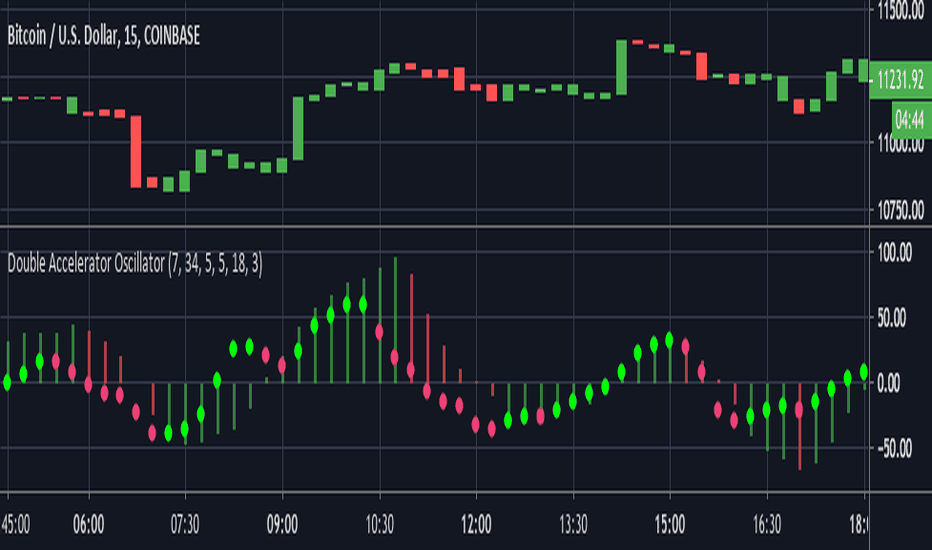
Williams Accelerator Oscillator — ACWhat it is
The Accelerator Oscillator (AC) measures the acceleration/deceleration of momentum. It’s derived from the Awesome Oscillator (AO) and shows whether momentum is speeding up or slowing down. In this implementation, columns are green when AC rises vs. the previous bar and red when it falls.
How it’s calculated
Price source: Median Price (HL2) by default; Close can be used instead.
AO = SMA(HL2, fastLen) − SMA(HL2, slowLen) (defaults: 5 & 34).
AC = AO − SMA(AO, signalLen) (default: 5).
Coloring: Green if AC > AC , else Red.
Zero line (optional) helps contextualize acceleration around neutral.
How to read it (typical interpretation)
Above 0: Upside acceleration (bullish pressure increasing).
Below 0: Downside acceleration (bearish pressure increasing).
Color sequences: Consecutive green columns suggest increasing upside acceleration; consecutive red columns suggest increasing downside acceleration.
Note: AC reflects change in momentum, not trend direction by itself. Many traders confirm with trend filters or price structure before acting.
Inputs
AO Fast SMA (default 5)
AO Slow SMA (default 34)
AC Signal SMA (default 5) — smoothing for the AO used in AC calc
Use Median Price (HL2) for AO (on/off)
Show zero line (on/off)
Show AO (for reference) (on/off)
Show AC signal (SMA of AO) (on/off)
Plots
AC Histogram — column chart colored by acceleration (green/red).
Zero — optional baseline at 0.
AO — optional reference line.
AO Signal (SMA) — optional smoothing line of AO.
Alerts
AC crosses above 0 — acceleration flips positive.
AC crosses below 0 — acceleration flips negative.
AC green above zero — AC rising and > 0.
AC red below zero — AC falling and < 0.
Usage tips
On lower timeframes, consider a slightly larger signalLen to reduce noise.
Confirm with price action, trend filters, or volatility context.
Values update intrabar; for stricter signals, confirm on bar close.
Limitations
AC is built from moving averages and is therefore lagging relative to raw price.
It is not normalized; behavior can vary by instrument and timeframe.
Do not use in isolation for entries/exits without risk management.
Credits
Concept by Bill Williams. This script is an independent implementation for educational and research purposes.
Disclaimer
No financial advice. Markets involve risk; test thoroughly before live use.
Indicador Pine Script®
FluidFlow OscillatorFluidFlow Oscillator: Study Material for Traders
Overview
The FluidFlow Oscillator is a custom technical indicator designed to measure price momentum and market flow dynamics by simulating fluid motion concepts such as velocity, viscosity, and turbulence. It helps traders identify potential buy and sell signals along with trend strength, momentum direction, and volatility conditions.
This study explains the underlying calculation concepts, signal logic, visual cues, and how to interpret the professional dashboard table that summarizes key indicator readings.
________________________________________
How the FluidFlow Oscillator Works
Core Mechanisms
1. Price Flow Velocity
o Measures the rate of change of price over a specified flow length (default 40 bars).
o Calculated as a percentage change of closing price: roc=close−closelen_flowcloselen_flow×100\text{roc} = \frac{\text{close} - \text{close}_{len\_flow}}{\text{close}_{len\_flow}} \times 100roc=closelen_flowclose−closelen_flow×100
o Smoothed by an EMA (Exponential Moving Average) to reduce noise, generating a "flow velocity" value.
2. Viscosity Factor
o Analogous to fluid viscosity, it adjusts the flow velocity based on recent price volatility.
o Volatility is computed as the standard deviation of close prices over the flow length.
o The viscosity acts as a damping factor to slow down the flow velocity in highly volatile conditions.
o This results in a "flow with viscosity" value, that smooths out the velocity considering market turbulence.
3. Turbulence Burst
o Captures sudden changes or bursts in the flow by measuring changes between successive viscosity-adjusted flows.
o The turbulence value is a smoothed absolute change in flow.
o A burst boost factor is added to the oscillator to incorporate this rapid change component, amplifying signals during sudden shifts.
4. Oscillator Calculation
o The raw oscillator value is the sum of flow with viscosity plus burst boost, scaled by 10.
o Clamped between -100 and +100 to limit extremes.
o Finally, smoothed again by EMA for cleaner visualization.
________________________________________
Signal Logic
The oscillator works with complementary components to produce actionable signals:
• Signal Line: An EMA-smoothed version of the oscillator for generating crossover-based signals.
• Momentum: The rate of change of the oscillator itself, smoothed by EMA.
• Trend: Uses fast (21-period EMA) and slow (50-period EMA) moving averages of price to identify market trend direction (uptrend, downtrend, or sideways).
Signal Conditions
• Bullish Signal (Buy): Oscillator crosses above the oversold threshold with positive momentum.
• Bearish Signal (Sell): Oscillator crosses below the overbought threshold with negative momentum.
Statuses
The oscillator provides descriptive market states based on level and momentum:
• Overbought
• Oversold
• Buy Signal
• Sell Signal
• Bullish / Bearish (momentum-driven)
• Neutral (no clear trend)
________________________________________
Color System and Visualization
The oscillator uses a sophisticated HSV color model adapting hues according to:
• Oscillator value magnitude and sign (positive or negative)
• Acceleration of oscillator changes
• Smooth color gradients to facilitate intuitive understanding of trend strength and momentum shifts
Background colors highlight overbought (red tint) and oversold (green tint) zones with transparency.
________________________________________
How to Understand the Professional Dashboard Table
The FluidFlow Oscillator offers an integrated table at the bottom center of the chart. This dashboard summarizes critical indicator readings in 8 columns across 3 rows:
Column Description
SIGNAL Current signal status (e.g., Buy, Sell, Overbought) with color coding
OSCILLATOR Current oscillator value (-100 to +100) with color reflecting intensity and direction
MOMENTUM Momentum bias indicating strength/direction of oscillator changes (Strong Up, Up, Sideways, Down, Strong Down)
TREND Current trend status based on EMAs (Strong Uptrend, Uptrend, Sideways, Downtrend, Strong Downtrend)
VOLATILITY Volatility percentage relative to average, indicating market activity level
FLOW Flow velocity value describing price momentum magnitude and direction
TURBULENCE Turbulence level indicating sudden bursts or spikes in price movement
PROGRESS Oscillator's position mapped as a percentage (0% to 100%) showing proximity to extreme levels
Rows Explained
• Row 1 (Header): Labels for each metric.
• Row 2 (Values): Current numerical or descriptive values color-coded along a professional scheme:
o Green or lime tones indicate positive or bullish conditions.
o Red or orange tones indicate caution, sell signals, or bearish conditions.
o Blue tones indicate neutral or stable conditions.
• Row 3 (Status Indicators): Emoji-like icons and bars provide a quick visual gauge of each metric's intensity or signal strength:
o For example, "🟢🟢🟢" suggests very strong bullish momentum, while "🔴🔴🔴" suggests strong bearish momentum.
o Progress bar visually demonstrates oscillator movement toward oversold or overbought extremes.
________________________________________
Practical Interpretation Tips
• A Buy signal with green colors and strong momentum usually precedes upward price moves.
• An Overbought status with red background and red table colors warns of potential price corrections or reversals.
• Watch the Turbulence to gauge market instability; spikes may precede price shocks or volatility bursts.
• Confirm signals with the Trend and Momentum columns to avoid false entries.
• Use the Progress bar to anticipate oscillations approaching key threshold levels for timing trades.
________________________________________
Alerts
The oscillator supports alerts for:
• Buy and sell signals based on oscillator crossovers.
• Overbought and oversold levels reached.
These help traders automate awareness of important market conditions.
________________________________________
Disclaimer
The FluidFlow Oscillator and its signals are for educational and informational purposes only. They do not guarantee profits and should not be considered as financial advice. Always conduct your own research and use proper risk management when trading. Past performance is not indicative of future results.
________________________________________
This detailed explanation should help you understand the workings of the FluidFlow Oscillator, its components, signal logic, and how to analyze its professional dashboard for informed trading decisions.
Indicador Pine Script®
AO/AC Zones (Log Price)William's AO/AC Zones scaled to work with log-price AO/AC indicators.
When the log AO and log AC are green = price bar is painted green
When the log AO and log AC are different = price bar painted gray
When the log AO and log AC are red = price bar painted red
Useful for seeing when momentum is beginning to increase or decrease, and direction on the AO/AC could be changing. Can also be used with William's standard entry and exit signals. Works with the log indicators, made for volatile and long-term charts which exhibit logarithmic trends.
Indicador Pine Script®
William's Accelerator Oscillator (AC) - Log-ScaledA 5-34-5 MACD histogram, aka William's Accelerator Oscillator, scaled to log-price.
Useful for seeing the change in the speed of the momentum, particularly within the log-scaled AO. Works better than the original (non log) AC for long-term and volatile price action which exhibits logarithmic growth trends.
Indicador Pine Script®
AO/AC Trading Zones Strategy [Skyrexio] Overview
AO/AC Trading Zones Strategy leverages the combination of Awesome Oscillator (AO), Acceleration/Deceleration Indicator (AC), Williams Fractals, Williams Alligator and Exponential Moving Average (EMA) to obtain the high probability long setups. Moreover, strategy uses multi trades system, adding funds to long position if it considered that current trend has likely became stronger. Combination of AO and AC is used for creating so-called trading zones to create the signals, while Alligator and Fractal are used in conjunction as an approximation of short-term trend to filter them. At the same time EMA (default EMA's period = 100) is used as high probability long-term trend filter to open long trades only if it considers current price action as an uptrend. More information in "Methodology" and "Justification of Methodology" paragraphs. The strategy opens only long trades.
Unique Features
No fixed stop-loss and take profit: Instead of fixed stop-loss level strategy utilizes technical condition obtained by Fractals and Alligator to identify when current uptrend is likely to be over. In some special cases strategy uses AO and AC combination to trail profit (more information in "Methodology" and "Justification of Methodology" paragraphs)
Configurable Trading Periods: Users can tailor the strategy to specific market windows, adapting to different market conditions.
Multilayer trades opening system: strategy uses only 10% of capital in every trade and open up to 5 trades at the same time if script consider current trend as strong one.
Short and long term trend trade filters: strategy uses EMA as high probability long-term trend filter and Alligator and Fractal combination as a short-term one.
Methodology
The strategy opens long trade when the following price met the conditions:
1. Price closed above EMA (by default, period = 100). Crossover is not obligatory.
2. Combination of Alligator and Williams Fractals shall consider current trend as an upward (all details in "Justification of Methodology" paragraph)
3. Both AC and AO shall print two consecutive increasing values. At the price candle close which corresponds to this condition algorithm opens the first long trade with 10% of capital.
4. If combination of Alligator and Williams Fractals shall consider current trend has been changed from up to downtrend, all long trades will be closed, no matter how many trades has been opened.
5. If AO and AC both continue printing the rising values strategy opens the long trade on each candle close with 10% of capital while number of opened trades reaches 5.
6. If AO and AC both has printed 5 rising values in a row algorithm close all trades if candle's low below the low of the 5-th candle with rising AO and AC values in a row.
Script also has additional visuals. If second long trade has been opened simultaneously the Alligator's teeth line is plotted with the green color. Also for every trade in a row from 2 to 5 the label "Buy More" is also plotted just below the teeth line. With every next simultaneously opened trade the green color of the space between teeth and price became less transparent.
Strategy settings
In the inputs window user can setup strategy setting:
EMA Length (by default = 100, period of EMA, used for long-term trend filtering EMA calculation).
User can choose the optimal parameters during backtesting on certain price chart.
Justification of Methodology
Let's explore the key concepts of this strategy and understand how they work together. We'll begin with the simplest: the EMA.
The Exponential Moving Average (EMA) is a type of moving average that assigns greater weight to recent price data, making it more responsive to current market changes compared to the Simple Moving Average (SMA). This tool is widely used in technical analysis to identify trends and generate buy or sell signals. The EMA is calculated as follows:
1.Calculate the Smoothing Multiplier:
Multiplier = 2 / (n + 1), Where n is the number of periods.
2. EMA Calculation
EMA = (Current Price) × Multiplier + (Previous EMA) × (1 − Multiplier)
In this strategy, the EMA acts as a long-term trend filter. For instance, long trades are considered only when the price closes above the EMA (default: 100-period). This increases the likelihood of entering trades aligned with the prevailing trend.
Next, let’s discuss the short-term trend filter, which combines the Williams Alligator and Williams Fractals. Williams Alligator
Developed by Bill Williams, the Alligator is a technical indicator that identifies trends and potential market reversals. It consists of three smoothed moving averages:
Jaw (Blue Line): The slowest of the three, based on a 13-period smoothed moving average shifted 8 bars ahead.
Teeth (Red Line): The medium-speed line, derived from an 8-period smoothed moving average shifted 5 bars forward.
Lips (Green Line): The fastest line, calculated using a 5-period smoothed moving average shifted 3 bars forward.
When the lines diverge and align in order, the "Alligator" is "awake," signaling a strong trend. When the lines overlap or intertwine, the "Alligator" is "asleep," indicating a range-bound or sideways market. This indicator helps traders determine when to enter or avoid trades.
Fractals, another tool by Bill Williams, help identify potential reversal points on a price chart. A fractal forms over at least five consecutive bars, with the middle bar showing either:
Up Fractal: Occurs when the middle bar has a higher high than the two preceding and two following bars, suggesting a potential downward reversal.
Down Fractal: Happens when the middle bar shows a lower low than the surrounding two bars, hinting at a possible upward reversal.
Traders often use fractals alongside other indicators to confirm trends or reversals, enhancing decision-making accuracy.
How do these tools work together in this strategy? Let’s consider an example of an uptrend.
When the price breaks above an up fractal, it signals a potential bullish trend. This occurs because the up fractal represents a shift in market behavior, where a temporary high was formed due to selling pressure. If the price revisits this level and breaks through, it suggests the market sentiment has turned bullish.
The breakout must occur above the Alligator’s teeth line to confirm the trend. A breakout below the teeth is considered invalid, and the downtrend might still persist. Conversely, in a downtrend, the same logic applies with down fractals.
In this strategy if the most recent up fractal breakout occurs above the Alligator's teeth and follows the last down fractal breakout below the teeth, the algorithm identifies an uptrend. Long trades can be opened during this phase if a signal aligns. If the price breaks a down fractal below the teeth line during an uptrend, the strategy assumes the uptrend has ended and closes all open long trades.
By combining the EMA as a long-term trend filter with the Alligator and fractals as short-term filters, this approach increases the likelihood of opening profitable trades while staying aligned with market dynamics.
Now let's talk about the trading zones concept and its signals. To understand this we need to briefly introduce what is AO and AC. The Awesome Oscillator (AO), developed by Bill Williams, is a momentum indicator designed to measure market momentum by contrasting recent price movements with a longer-term historical perspective. It helps traders detect potential trend reversals and assess the strength of ongoing trends.
The formula for AO is as follows:
AO = SMA5(Median Price) − SMA34(Median Price)
where:
Median Price = (High + Low) / 2
SMA5 = 5-period Simple Moving Average of the Median Price
SMA 34 = 34-period Simple Moving Average of the Median Price
The Acceleration/Deceleration (AC) Indicator, introduced by Bill Williams, measures the rate of change in market momentum. It highlights shifts in the driving force of price movements and helps traders spot early signs of trend changes. The AC Indicator is particularly useful for identifying whether the current momentum is accelerating or decelerating, which can indicate potential reversals or continuations. For AC calculation we shall use the AO calculated above is the following formula:
AC = AO − SMA5(AO) , where SMA5(AO)is the 5-period Simple Moving Average of the Awesome Oscillator
When the AC is above the zero line and rising, it suggests accelerating upward momentum.
When the AC is below the zero line and falling, it indicates accelerating downward momentum.
When the AC is below zero line and rising it suggests the decelerating the downtrend momentum. When AC is above the zero line and falling, it suggests the decelerating the uptrend momentum.
Now let's discuss the trading zones concept and how it can create the signal. Zones are created by the combination of AO and AC. We can divide three zone types:
Greed zone: when the AO and AC both are rising
Red zone: when the AO and AC both are decreasing
Gray zone: when one of AO or AC is rising, the other is falling
Gray zone is considered as uncertainty. AC and AO are moving in the opposite direction. Strategy skip such price action to decrease the chance to stuck in the losing trade during potential sideways. Red zone is also not interesting for the algorithm because both indicators consider the trend as bearish, but strategy opens only long trades. It is waiting for the green zone to increase the chance to open trade in the direction of the potential uptrend. When we have 2 candles in a row in the green zone script executes a long trade with 10% of capital.
Two green zone candles in a row is considered by algorithm as a bullish trend, but now so strong, that's the reason why trade is going to be closed when the combination of Alligator and Fractals will consider the the trend change from bullish to bearish. If id did not happens, algorithm starts to count the green zone candles in a row. When we have 5 in a row script change the trade closing condition. Such situation is considered is a high probability strong bull market and all trades will be closed if candle's low will be lower than fifth green zone candle's low. This is used to increase probability to secure the profit. If long trades are initiated, the strategy continues utilizing subsequent signals until the total number of trades reaches a maximum of 5. Each trade uses 10% of capital.
Why we use trading zones signals? If currently strategy algorithm considers the high probability of the short-term uptrend with the Alligator and Fractals combination pointed out above and the long-term trend is also suggested by the EMA filter as bullish. Rising AC and AO values in the direction of the most likely main trend signaling that we have the high probability of the fastest bullish phase on the market. The main idea is to take part in such rapid moves and add trades if this move continues its acceleration according to indicators.
Backtest Results
Operating window: Date range of backtests is 2023.01.01 - 2024.12.31. It is chosen to let the strategy to close all opened positions.
Commission and Slippage: Includes a standard Binance commission of 0.1% and accounts for possible slippage over 5 ticks.
Initial capital: 10000 USDT
Percent of capital used in every trade: 10%
Maximum Single Position Loss: -9.49%
Maximum Single Profit: +24.33%
Net Profit: +4374.70 USDT (+43.75%)
Total Trades: 278 (39.57% win rate)
Profit Factor: 2.203
Maximum Accumulated Loss: 668.16 USDT (-5.43%)
Average Profit per Trade: 15.74 USDT (+1.37%)
Average Trade Duration: 60 hours
How to Use
Add the script to favorites for easy access.
Apply to the desired timeframe and chart (optimal performance observed on 4h BTC/USDT).
Configure settings using the dropdown choice list in the built-in menu.
Set up alerts to automate strategy positions through web hook with the text: {{strategy.order.alert_message}}
Disclaimer:
Educational and informational tool reflecting Skyrex commitment to informed trading. Past performance does not guarantee future results. Test strategies in a simulated environment before live implementation
These results are obtained with realistic parameters representing trading conditions observed at major exchanges such as Binance and with realistic trading portfolio usage parameters.
Estratégia Pine Script®
MultiLayer Acceleration/Deceleration Strategy [Skyrexio]Overview
MultiLayer Acceleration/Deceleration Strategy leverages the combination of Acceleration/Deceleration Indicator(AC), Williams Alligator, Williams Fractals and Exponential Moving Average (EMA) to obtain the high probability long setups. Moreover, strategy uses multi trades system, adding funds to long position if it considered that current trend has likely became stronger. Acceleration/Deceleration Indicator is used for creating signals, while Alligator and Fractal are used in conjunction as an approximation of short-term trend to filter them. At the same time EMA (default EMA's period = 100) is used as high probability long-term trend filter to open long trades only if it considers current price action as an uptrend. More information in "Methodology" and "Justification of Methodology" paragraphs. The strategy opens only long trades.
Unique Features
No fixed stop-loss and take profit: Instead of fixed stop-loss level strategy utilizes technical condition obtained by Fractals and Alligator to identify when current uptrend is likely to be over (more information in "Methodology" and "Justification of Methodology" paragraphs)
Configurable Trading Periods: Users can tailor the strategy to specific market windows, adapting to different market conditions.
Multilayer trades opening system: strategy uses only 10% of capital in every trade and open up to 5 trades at the same time if script consider current trend as strong one.
Short and long term trend trade filters: strategy uses EMA as high probability long-term trend filter and Alligator and Fractal combination as a short-term one.
Methodology
The strategy opens long trade when the following price met the conditions:
1. Price closed above EMA (by default, period = 100). Crossover is not obligatory.
2. Combination of Alligator and Williams Fractals shall consider current trend as an upward (all details in "Justification of Methodology" paragraph)
3. Acceleration/Deceleration shall create one of two types of long signals (all details in "Justification of Methodology" paragraph). Buy stop order is placed one tick above the candle's high of last created long signal.
4. If price reaches the order price, long position is opened with 10% of capital.
5. If currently we have opened position and price creates and hit the order price of another one long signal, another one long position will be added to the previous with another one 10% of capital. Strategy allows to open up to 5 long trades simultaneously.
6. If combination of Alligator and Williams Fractals shall consider current trend has been changed from up to downtrend, all long trades will be closed, no matter how many trades has been opened.
Script also has additional visuals. If second long trade has been opened simultaneously the Alligator's teeth line is plotted with the green color. Also for every trade in a row from 2 to 5 the label "Buy More" is also plotted just below the teeth line. With every next simultaneously opened trade the green color of the space between teeth and price became less transparent.
Strategy settings
In the inputs window user can setup strategy setting: EMA Length (by default = 100, period of EMA, used for long-term trend filtering EMA calculation). User can choose the optimal parameters during backtesting on certain price chart.
Justification of Methodology
Let's explore the key concepts of this strategy and understand how they work together. We'll begin with the simplest: the EMA.
The Exponential Moving Average (EMA) is a type of moving average that assigns greater weight to recent price data, making it more responsive to current market changes compared to the Simple Moving Average (SMA). This tool is widely used in technical analysis to identify trends and generate buy or sell signals. The EMA is calculated as follows:
1.Calculate the Smoothing Multiplier:
Multiplier = 2 / (n + 1), Where n is the number of periods.
2. EMA Calculation
EMA = (Current Price) × Multiplier + (Previous EMA) × (1 − Multiplier)
In this strategy, the EMA acts as a long-term trend filter. For instance, long trades are considered only when the price closes above the EMA (default: 100-period). This increases the likelihood of entering trades aligned with the prevailing trend.
Next, let’s discuss the short-term trend filter, which combines the Williams Alligator and Williams Fractals. Williams Alligator
Developed by Bill Williams, the Alligator is a technical indicator that identifies trends and potential market reversals. It consists of three smoothed moving averages:
Jaw (Blue Line): The slowest of the three, based on a 13-period smoothed moving average shifted 8 bars ahead.
Teeth (Red Line): The medium-speed line, derived from an 8-period smoothed moving average shifted 5 bars forward.
Lips (Green Line): The fastest line, calculated using a 5-period smoothed moving average shifted 3 bars forward.
When the lines diverge and align in order, the "Alligator" is "awake," signaling a strong trend. When the lines overlap or intertwine, the "Alligator" is "asleep," indicating a range-bound or sideways market. This indicator helps traders determine when to enter or avoid trades.
Fractals, another tool by Bill Williams, help identify potential reversal points on a price chart. A fractal forms over at least five consecutive bars, with the middle bar showing either:
Up Fractal: Occurs when the middle bar has a higher high than the two preceding and two following bars, suggesting a potential downward reversal.
Down Fractal: Happens when the middle bar shows a lower low than the surrounding two bars, hinting at a possible upward reversal.
Traders often use fractals alongside other indicators to confirm trends or reversals, enhancing decision-making accuracy.
How do these tools work together in this strategy? Let’s consider an example of an uptrend.
When the price breaks above an up fractal, it signals a potential bullish trend. This occurs because the up fractal represents a shift in market behavior, where a temporary high was formed due to selling pressure. If the price revisits this level and breaks through, it suggests the market sentiment has turned bullish.
The breakout must occur above the Alligator’s teeth line to confirm the trend. A breakout below the teeth is considered invalid, and the downtrend might still persist. Conversely, in a downtrend, the same logic applies with down fractals.
In this strategy if the most recent up fractal breakout occurs above the Alligator's teeth and follows the last down fractal breakout below the teeth, the algorithm identifies an uptrend. Long trades can be opened during this phase if a signal aligns. If the price breaks a down fractal below the teeth line during an uptrend, the strategy assumes the uptrend has ended and closes all open long trades.
By combining the EMA as a long-term trend filter with the Alligator and fractals as short-term filters, this approach increases the likelihood of opening profitable trades while staying aligned with market dynamics.
Now let's talk about Acceleration/Deceleration signals. AC indicator is calculated using the Awesome Oscillator, so let's first of all briefly explain what is Awesome Oscillator and how it can be calculated. The Awesome Oscillator (AO), developed by Bill Williams, is a momentum indicator designed to measure market momentum by contrasting recent price movements with a longer-term historical perspective. It helps traders detect potential trend reversals and assess the strength of ongoing trends.
The formula for AO is as follows:
AO = SMA5(Median Price) − SMA34(Median Price)
where:
Median Price = (High + Low) / 2
SMA5 = 5-period Simple Moving Average of the Median Price
SMA 34 = 34-period Simple Moving Average of the Median Price
The Acceleration/Deceleration (AC) Indicator, introduced by Bill Williams, measures the rate of change in market momentum. It highlights shifts in the driving force of price movements and helps traders spot early signs of trend changes. The AC Indicator is particularly useful for identifying whether the current momentum is accelerating or decelerating, which can indicate potential reversals or continuations. For AC calculation we shall use the AO calculated above is the following formula:
AC = AO − SMA5(AO), where SMA5(AO)is the 5-period Simple Moving Average of the Awesome Oscillator
When the AC is above the zero line and rising, it suggests accelerating upward momentum.
When the AC is below the zero line and falling, it indicates accelerating downward momentum.
When the AC is below zero line and rising it suggests the decelerating the downtrend momentum. When AC is above the zero line and falling, it suggests the decelerating the uptrend momentum.
Now we can explain which AC signal types are used in this strategy. The first type of long signal is when AC value is below zero line. In this cases we need to see three rising bars on the histogram in a row after the falling one. The second type of signals occurs above the zero line. There we need only two rising AC bars in a row after the falling one to create the signal. The signal bar is the last green bar in this sequence. The strategy places the buy stop order one tick above the candle's high, which corresponds to the signal bar on AC indicator.
After that we can have the following scenarios:
Price hit the order on the next candle in this case strategy opened long with this price.
Price doesn't hit the order price, the next candle set lower high. If current AC bar is increasing buy stop order changes by the script to the high of this new bar plus one tick. This procedure repeats until price finally hit buy order or current AC bar become decreasing. In the second case buy order cancelled and strategy wait for the next AC signal.
If long trades are initiated, the strategy continues utilizing subsequent signals until the total number of trades reaches a maximum of 5. All open trades are closed when the trend shifts to a downtrend, as determined by the combination of the Alligator and Fractals described earlier.
Why we use AC signals? If currently strategy algorithm considers the high probability of the short-term uptrend with the Alligator and Fractals combination pointed out above and the long-term trend is also suggested by the EMA filter as bullish. Rising AC bars after period of falling AC bars indicates the high probability of local pull back end and there is a high chance to open long trade in the direction of the most likely main uptrend. The numbers of rising bars are different for the different AC values (below or above zero line). This is needed because if AC below zero line the local downtrend is likely to be stronger and needs more rising bars to confirm that it has been changed than if AC is above zero.
Why strategy use only 10% per signal? Sometimes we can see the false signals which appears on sideways. Not risking that much script use only 10% per signal. If the first long trade has been open and price continue going up and our trend approximation by Alligator and Fractals is uptrend, strategy add another one 10% of capital to every next AC signal while number of active trades no more than 5. This capital allocation allows to take part in long trades when current uptrend is likely to be strong and use only 10% of capital when there is a high probability of sideways.
Backtest Results
Operating window: Date range of backtests is 2023.01.01 - 2024.11.01. It is chosen to let the strategy to close all opened positions.
Commission and Slippage: Includes a standard Binance commission of 0.1% and accounts for possible slippage over 5 ticks.
Initial capital: 10000 USDT
Percent of capital used in every trade: 10%
Maximum Single Position Loss: -5.15%
Maximum Single Profit: +24.57%
Net Profit: +2108.85 USDT (+21.09%)
Total Trades: 111 (36.94% win rate)
Profit Factor: 2.391
Maximum Accumulated Loss: 367.61 USDT (-2.97%)
Average Profit per Trade: 19.00 USDT (+1.78%)
Average Trade Duration: 75 hours
How to Use
Add the script to favorites for easy access.
Apply to the desired timeframe and chart (optimal performance observed on 3h BTC/USDT).
Configure settings using the dropdown choice list in the built-in menu.
Set up alerts to automate strategy positions through web hook with the text: {{strategy.order.alert_message}}
Disclaimer:
Educational and informational tool reflecting Skyrex commitment to informed trading. Past performance does not guarantee future results. Test strategies in a simulated environment before live implementation
These results are obtained with realistic parameters representing trading conditions observed at major exchanges such as Binance and with realistic trading portfolio usage parameters.
Estratégia Pine Script®
Fear Greed Zones by Relative Strength IndexThis is a visual modification of the relative Strength Index (RSI) to express extreme areas as fear and greed Zones.
// Input
rsiLength = input.int(14, "RSI Length", minval=1)
// RSI calculation
rsi = ta.rsi(close, rsiLength)
FEAR GREED ZONES
The "Fear Greed Zones Script" indicator is designed to help traders identify psychological levels of fear and greed in the market by utilising relative strength index. It primarily utilises the Relative Strength Index of price to gauge market sentiment, with the following key features:
Color-Codes
Dark Red: Indicates a greed zone , suggesting extreme overbought conditions (high risk) and a possible price reversal downward.
Dark Green: Represents a fear zone, indicating extreme oversold conditions (low risk) and potential for price reversal upward.
Yellow: Serves as a neutral zone with medium risk.
Usage
Market Sentiment Analysis: Traders can use the fear and greed zones to assess overall market sentiment, aligning their strategies with prevailing emotional biases. This helps in identifying potential entry and exit points based on market psychology.
Risk Management: Understanding fear or greed influences market behavior and allows traders to manage their risk more effectively with the knowledge of high or low risk areas; as they can anticipate potential reversals or continuations in price trends.
Conclusion
The "Fear Greed Zones" Script is a valuable tool for traders looking to leverage market psychology. By clearly identifying areas where fear or greed may be influencing price movements, it aids in making more informed trading decisions.
Indicador Pine Script®
Turbo Oscillator [RunRox]Introducing Turbo Oscillator by RunRox, our new indicator that combines a multitude of useful and unique features, which we will detail in this post.
List of Advanced Technologies:
Real-Time Divergences: Detects discrepancies between price movements and oscillator indicators to forecast potential price reversals.
Real-Time Hidden Divergences: We identify hidden divergences in real-time. These are not the standard type of divergences; they are opposite to regular divergences, providing unique insights into potential market movements.
Overbought and Oversold Zones: Identifies areas where the market is potentially overextended, suggesting possible entry and exit points.
Signal Line: Indicates the market direction, helping traders to quickly understand current trends.
Money Flow Histogram: Shows the flow of money into and out of the market, providing insights into buying and selling pressure.
Predicted Reversal Zones: Pinpoints areas where the market might experience reversals, aiding in strategic planning and risk management. These zones also serve as potential areas for taking profits, enhancing their utility for exit strategy planning.
Customizable Alerts: You can flexibly set up alerts for any events detected by our indicator, ensuring you stay informed about critical market movements.
To begin with, I would like to describe the difference between classic divergences and hidden divergences.
As you can see, these are opposite situations. Our oscillator identifies both types of divergences and displays them in real-time.
Divergences can serve as points where the price might reverse in the opposite direction, making both classic and hidden divergences powerful tools for spotting reversal points. I'll show a few examples of how divergences are used in our oscillator.
Classic Divergences - which we identify in real-time. As you can see, the price often reacts strongly to the formation of these divergences, frequently changing its direction.
Hidden Divergences - we also observe frequent movement in the opposite direction on the chart. The advantage of our indicator is that we show divergences in real-time without delays, allowing you to react immediately to trend changes.
Overbought and Oversold Zones - These zones allow you to see trend changes when the price is clearly overbought or oversold. When the color changes from a contrasting shade to a neutral one, you can observe the trend shift. The lines work by combining the positivity/negativity of the histogram, the positivity/negativity of the signal line, and the direction of the signal line (red/green). This sophisticated interaction provides precise insights into market conditions, making it an invaluable tool for traders.
Signal Line - This provides insights into trend changes and price reversals. The points on the line better indicate the beginning of a trend shift. These points can vary in size, offering a clearer understanding of the strength of the emerging trend. This feature works in combination with RSI, Stochastic, and MFI. RSI and MFI are top-tier indicators, while Stochastic adds responsiveness and sensitivity to trend changes, ensuring you capture every market movement accurately and promptly.
Money Flow Histogram - As shown in the example, our histogram displays the divergence between money flow and the actual price. You can see that while the price is rising, the money flow is decreasing, indicating insufficient demand for the asset and an imminent trend change. This feature uses MFI with an extended period, providing a more comprehensive and accurate analysis of market conditions. The extended period enhances the reliability of the Money Flow Index, making it an essential tool for identifying subtle shifts in market dynamics.
Predicted Reversal Zones - We automatically identify potential price reversal zones and display them above our overbought and oversold zones. In cases of strong overbought or oversold conditions, we detect potential price pullbacks and mark the beginning of a trend change. This helps you better identify trend shifts. We recommend considering these zones as potential take profit points for your trades.
Customizable Alerts - Our flexible alert system allows you to receive notifications only for the events you are interested in. These can include:
1. Classic Divergences
2. Hidden Divergences
3. Overbought or Oversold conditions on the status line
4. Strong Overbought or Oversold conditions on the status line
5. Signals from the signal line
6. Reversal zones in any direction
Our oscillator is a unique indicator that provides a comprehensive understanding of price movements. It can be used as a standalone tool for analyzing price action.
Here are a few examples of using our Oscillator in practice:
In the example above, you can see three conditions that have formed for a potential trade:
1. Clear overbought condition with a formed reversal point.
2. Decreasing Money Flow Index diverging from the rising price.
3. Formed classic divergence.
The entry point could be the formed divergence, while the exit point could be the overbought condition at the bottom of the oscillator along with the reversal points.
Here's another example of using hidden divergence, where you can see three conditions for a potential trade:
1. Overbought zone
2. Formed hidden divergence
3. Start of bearish movement indicated by the signal line
You can enter the trade either when the hidden divergence forms or wait for confirmation of the trend change by the signal line and enter the trade when the corresponding signal forms on the signal line. The exit point could be the opposite reversal point or the formation of a new hidden divergence.
We have demonstrated a few examples of how you can use our indicator, but we are confident that you will find many more applications in your own strategies.
Oscillator offers a variety of customizable parameters to tailor the indicator to your trading preferences. Here’s what our settings include:
Signal Line
Turn On/Off: Enable or disable the signal line.
Length: Set the length period for the signal line calculation.
Smooth: Adjust the smoothing level of the signal line for more accurate display.
Histogram
Turn On/Off: Enable or disable the histogram.
Length: Set the length period for the histogram calculation.
Smooth: Adjust the smoothing level of the histogram.
Other
Show Divergence Line: Display divergence lines on the chart.
Show Hidden Divergence: Display hidden divergences.
Show Status Line: Show the status line indicating overbought or oversold conditions.
Show TP Signal: Display signals for take profit.
Show Reversal Points: Display potential trend reversal points.
Delete Broken Divergence Lines: Remove broken divergence lines from the chart.
Alerts Customization
Signal Line Bull/Bear: Set alerts for bullish or bearish signals from the signal line.
TP Bull/Bear: Set alerts for take profit signals.
Status Bull/Bear: Set alerts for bullish or bearish status conditions.
Status Bull+/Bear+: Set enhanced alerts for stronger bullish or bearish status conditions.
Divergence Bull/Bear: Set alerts for bullish or bearish divergences.
Hidden Divergence Bull/Bear: Set alerts for hidden bullish or bearish divergences.
With these comprehensive settings, you can fine-tune the Oscillator to perfectly fit your trading strategy and preferences.
Our indicator utilizes technologies such as RSI, Stochastic, and Money Flow Index, with numerous enhancements from our team. It includes exclusive features such as real-time detection of hidden and classic divergences, identification of reversal points using our unique methodology, and much more.
Disclaimer:
While we consider our Turbo Oscillator to be an excellent tool, it is important to understand that past performance is not indicative of future results. We recommend approaching market analysis comprehensively, using a combination of tools and techniques to make well-informed trading decisions. Always consider the full range of market data and risks when using any trading indicator.
Indicador Pine Script®
Volume change [ Unlimited ]This indicator displays volume and volume change information on a chart. It is designed to help traders analyze changes in trading volume over time and identify potential trading opportunities.
The indicator takes an input from the user to set the length of the exponential moving average (EMA) applied to the volume data. This EMA is used to smooth out short-term fluctuations in volume and highlight the overall trend in volume.
The indicator calculates whether the current bar is up or down and calculates the change in volume. It then sets the color of the volume and volume change columns based on whether the bar is up or down and whether the volume change is positive or negative.
By displaying this information on a chart, the indicator can help traders identify patterns or trends in volume and volume change that may indicate potential trading opportunities. For example, increasing volume along with rising prices could indicate strong buying pressure and a potential bullish trend, while decreasing volume along with falling prices could indicate weak selling pressure and a potential bearish trend.
Indicador Pine Script®
Rainbow Indicator - Polfwack ProThis is a reverse engineered completely free Version of an Indicator that you would normally have to spend huge amounts of money on. I personally believe that no one should pay a fortune for access to an Indicator that contains huge amounts of freely available stuff.
This indicator claims to be even better than Market Cipher. Turns out it uses - just as Market Cipher, freely available Indicators and puts them in a nice looking package. I packed in as much as it made sense, the original Indicator is visually very cluttered with - in my opinion, too much random stuff that I have left out for a cleaner look, for example the truckload of entry signals, MFI and that Autotrendline feature that no one really needs because the human brain is way better at drawing lines.
Was is included? From top to bottom:
1st Bar -> Color coded RSI status. It shows Oversold and Overbought, Bullish, Hidden Bullish, Bearish and Hidden Bearish Divergences.
2nd Bar -> Color coded Market Structure Analyser. It shows if the market is currently ranging, bullish or bearish based on calculated pivots and outbreaks of said pivots. Bullish and Bearish breaks are also being printed.
Main Oscillator -> An Awesome Oscillator (AO) that prints bullish, hidden bullish, bearish and hidden bearish divergences as well as positive and negative Pivot Points.
Bollinger Bands -> They are following the AO and are color coded to the long term trend indicator for less visual clutter.
Secondary Oscillator -> Accelerator Oscillator (AC).
3rd Bar -> Color coded longer term trend indicator, it mirrors the color code on the Bollinger Bands. The original uses an ATR-based calculation, but I found a Kumo cloud to be more simple and more reliable for this kind of thing.
4th Bar -> Color coded mirror of the Accelerator Oscillator.
I tried to make the whole Indicator as adjustable as possible, most of the variables can be edited to your liking.
On the internet you can find all sorts of strategies for every single of the included indicators.
I hope that I have saved you at least some money. Good luck.
Indicador Pine Script®
Awesome Oscillator_VTX
Abbreviations:
AO - Awesome Oscillator
AC - Accelerator Oscillator
TP - TimePeriod (1m,2m,5m,1h....)
TP Steps - 1m,3m,12m,1h,5h,D (This steps i use)
Use-case:
Awesome Oscillator best used to find Divergence/Convergence what results in Weakening of Momentum and Price reversals.
This script calculates and plots AO/AC with minute precision, removing GAPS when projecting Higher Period AO/AC.
So you can accommodate all important information on one chart with best precision.
Made for Intraday Perioads.
Best used for DayTrading, when you need to make quick and efficient decisions.
Calculation = Preferred resolution * Length / Present resolution.
As Additional Function, this Awesome Oscillator has AC built in.
Settings:
Resolution - Most used TP included, plus some exclusive paid plans (1m, 2m, 3m, 5m, 12m, 15m, 1h, 4h, 5h, Daily). Default set to 1h
Use AO - You can switch between EMA and SMA for FastMA/SlowMA calculation. Default set to EMA
FastMA - standard function. Default set to 5
SlowMA - standard function. Default set to 34
Signal Line - Plots MA to show Momentum. Uses EMA/SMA based on "Use AO" selection. Default set to 5
Use AC - You can switch between EMA and SMA for AC calculation. Default set to SMA
Offset - standard function. Default set to 0
Accelerator - AC length. Default set to 5
Source - standard function. Default set to hlc3
Why to use it ?
Yes, i know that variable TP is standard now in TradingView. But there are some limitations, especially for DayTraders.
Problem:
Imagine you are trading/scalping on 1m.. 5m.. 15.. charts and you want to see where are your on Higher TP.
-- You can change to 1h and check it, but you will loose the picture from smaller TP.
-- You can use Standard TP function, but your data will update every 15m, 1h (depends on TP). And in result you have Gaps between bars.
Solution:
This script help to solve this problem, by breaking information down to 1m and building from there.
So whatever Intraday TP you choose to trade, your AO/AC will be updated with minute precision.
Limitations:
Sadly nothing without limitations.
1. For Best performance use only Higher TP dividable By Yours (ex. You use 3m chart, then you can plot 12m, 15m, 1h / You use 5m chart, then you can plot 15m, 1h. 12m will already have 3m of information lost using 5m Chart )
Indicador Pine Script®
Double Accelerator OscillatorThis is a modified version of Bill Williams' Accelerator. The Accelerator measures the difference between the Awesome Oscillator(another Williams indicator) and its 5 day SMA.
This script plots 2 accelerators rather than 1. Users can define the lengths of the fast and slow SMA's used in the Awesome Oscillator calculation by adjusting the options in the input menu.
We set the default the lengths of the fast and slow SMA's used in the first Awesome Oscillator calculation as 34 and 7 periods. Then to find the Accelerator Oscillator, the difference between the Awesome Oscillator and its 7 period SMA is calculated. The second Accelerator uses shorter window lengths than the first. The fast SMA length is 5 by default and the slow SMA length is 18. Finally, the length of the Awesome Oscillator SMA used to calculate the second Accelerator Oscillator is 3.
By utilizing two Accelerator Oscillators with increasingly shorter window lengths, this indicator identifies changes in momentum very well.
The red and green histogram represents the first Accelerator Oscillator. It is green when the Accelerator is increasing and red when it is decreasing. I found this layout to be more practical than the standard, which plots the AC as green when it is greater than 0 and red when less than zero. The second Accelerator Oscillator is plotted as the bright green and pink circle line. It uses the same coloring conditions as above.
Indicador Pine Script®
Bill Williams Chaos TheoryBill Williams Chaos Theory
- Alligator
- Fractals
- Accelerator Decelerator Oscillator
- Market Facilitation Index
Combining all of that to generate signal long or short.
Long entry when long signal appears.
Short entry when short signal appears.
For donations
BTC: 3E7rUPX7upS8iTj42JdLt7keJVbJLfvMoH
ETH: 0x094ed88e4c5a9b225e936586cbc2d61f4a027f68
Thank you & happy trading!
Indicador Pine Script®
Accelerator OscillatorThis indicator was originally developed by Bill M. Williams. Also known as Acceleration/Deceleration Oscillator.
Indicador Pine Script®