OPEN-SOURCE SCRIPT
Atualizado Current Candle
### Overview
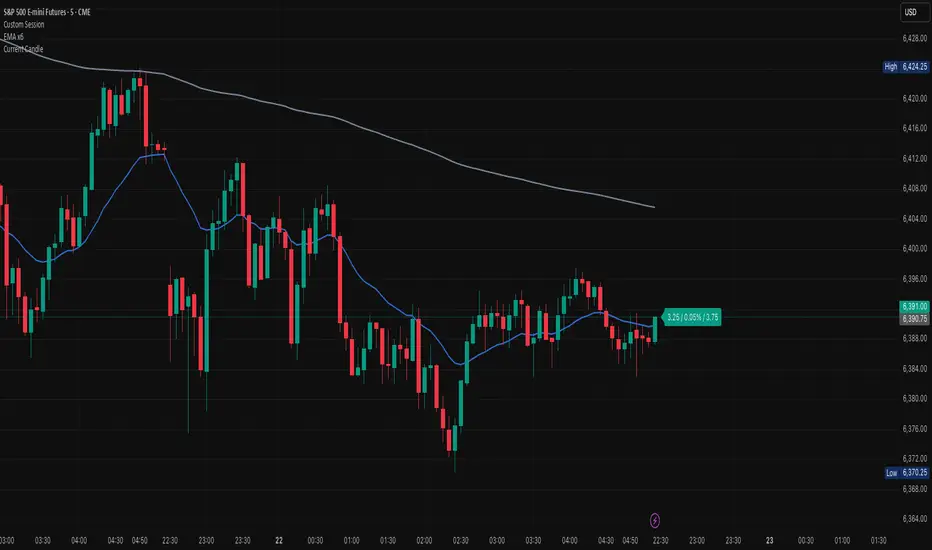
The **Current Candle** indicator displays live information about the active bar. It shows the price change, percentage change, and candle range (high–low), conveniently placed to the right of the current candle.
### Features
• Shows absolute price change from the previous close
• Shows percentage change (%)
• Shows candle range (high–low)
• Customizable bull and bear colors (default TradingView candle colors: green = rgb(8,153,129), red = rgb(242,54,44))
• Toggle on/off Value, Percentage, and Range individually
• Always updates on the latest candle only, keeping charts clean
### How to Use
1. Add the indicator to your chart.
2. Adjust the “Right offset (bars)” to position the label.
3. Enable or disable Value, Percentage, or Range via checkboxes.
4. Customize bull/bear colors to match your chart theme if desired.
### Notes
• Label is plotted only on the latest candle (`barstate.islast`) to avoid clutter.
• Colors cannot be automatically synced to your TradingView chart theme — use the color inputs to match them manually.
• This script is designed for clarity and quick reference without altering your chart’s candles.
---
*Stay focused on the current candle — see change, percentage, and range at a glance.*
The **Current Candle** indicator displays live information about the active bar. It shows the price change, percentage change, and candle range (high–low), conveniently placed to the right of the current candle.
### Features
• Shows absolute price change from the previous close
• Shows percentage change (%)
• Shows candle range (high–low)
• Customizable bull and bear colors (default TradingView candle colors: green = rgb(8,153,129), red = rgb(242,54,44))
• Toggle on/off Value, Percentage, and Range individually
• Always updates on the latest candle only, keeping charts clean
### How to Use
1. Add the indicator to your chart.
2. Adjust the “Right offset (bars)” to position the label.
3. Enable or disable Value, Percentage, or Range via checkboxes.
4. Customize bull/bear colors to match your chart theme if desired.
### Notes
• Label is plotted only on the latest candle (`barstate.islast`) to avoid clutter.
• Colors cannot be automatically synced to your TradingView chart theme — use the color inputs to match them manually.
• This script is designed for clarity and quick reference without altering your chart’s candles.
---
*Stay focused on the current candle — see change, percentage, and range at a glance.*
Notas de Lançamento
### OverviewThe **Current Candle** indicator displays live information about the active bar. It shows the price change, percentage change, and candle range (high–low), conveniently placed to the right of the current candle.
### Features
• Shows absolute price change from the previous close
• Shows percentage change (%)
• Shows candle range (high–low)
• Customizable bull and bear colors (default TradingView candle colors: green = rgb(8,153,129), red = rgb(242,54,44))
• Toggle on/off Value, Percentage, and Range individually
• Always updates on the latest candle only, keeping charts clean
### How to Use
1. Add the indicator to your chart.
2. Adjust the “Right offset (bars)” to position the label.
3. Enable or disable Value, Percentage, or Range via checkboxes.
4. Customize bull/bear colors to match your chart theme if desired.
### Notes
• Label is plotted only on the latest candle (`barstate.islast`) to avoid clutter.
• Colors cannot be automatically synced to your TradingView chart theme — use the color inputs to match them manually.
• This script is designed for clarity and quick reference without altering your chart’s candles.
---
*Stay focused on the current candle — see change, percentage, and range at a glance.*
Notas de Lançamento
### OverviewThe **Current Candle** indicator displays live information about the active bar. It shows the price change, percentage change, and candle range (high–low), conveniently placed to the right of the current candle.
### Features
• Shows absolute price change from the previous close
• Shows percentage change (%)
• Shows candle range (high–low)
• Customizable bull and bear colors (default TradingView candle colors: green = rgb(8,153,129), red = rgb(242,54,44))
• Toggle on/off Value, Percentage, and Range individually
• Always updates on the latest candle only, keeping charts clean
### How to Use
1. Add the indicator to your chart.
2. Adjust the “Right offset (bars)” to position the label.
3. Enable or disable Value, Percentage, or Range via checkboxes.
4. Customize bull/bear colors to match your chart theme if desired.
### Notes
• Label is plotted only on the latest candle (`barstate.islast`) to avoid clutter.
• Colors cannot be automatically synced to your TradingView chart theme — use the color inputs to match them manually.
• This script is designed for clarity and quick reference without altering your chart’s candles.
---
*Stay focused on the current candle — see change, percentage, and range at a glance.*
Notas de Lançamento
### OverviewThe **Current Candle** indicator displays live information about the active bar. It shows the price change, percentage change, and candle range (high–low), conveniently placed to the right of the current candle.
### Features
• Shows absolute price change from the previous close
• Shows percentage change (%)
• Shows candle range (high–low)
• Customizable bull and bear colors (default TradingView candle colors: green = rgb(8,153,129), red = rgb(242,54,44))
• Toggle on/off Value, Percentage, and Range individually
• Always updates on the latest candle only, keeping charts clean
### How to Use
1. Add the indicator to your chart.
2. Adjust the “Right offset (bars)” to position the label.
3. Enable or disable Value, Percentage, or Range via checkboxes.
4. Customize bull/bear colors to match your chart theme if desired.
### Notes
• Label is plotted only on the latest candle (`barstate.islast`) to avoid clutter.
• Colors cannot be automatically synced to your TradingView chart theme — use the color inputs to match them manually.
• This script is designed for clarity and quick reference without altering your chart’s candles.
---
*Stay focused on the current candle — see change, percentage, and range at a glance.*
Script de código aberto
Em verdadeiro espírito do TradingView, o criador deste script o tornou de código aberto, para que os traders possam revisar e verificar sua funcionalidade. Parabéns ao autor! Embora você possa usá-lo gratuitamente, lembre-se de que a republicação do código está sujeita às nossas Regras da Casa.

Aviso legal
As informações e publicações não se destinam a ser, e não constituem, conselhos ou recomendações financeiras, de investimento, comerciais ou de outro tipo fornecidos ou endossados pela TradingView. Leia mais nos Termos de Uso.
Script de código aberto
Em verdadeiro espírito do TradingView, o criador deste script o tornou de código aberto, para que os traders possam revisar e verificar sua funcionalidade. Parabéns ao autor! Embora você possa usá-lo gratuitamente, lembre-se de que a republicação do código está sujeita às nossas Regras da Casa.
Aviso legal
As informações e publicações não se destinam a ser, e não constituem, conselhos ou recomendações financeiras, de investimento, comerciais ou de outro tipo fornecidos ou endossados pela TradingView. Leia mais nos Termos de Uso.