OPEN-SOURCE SCRIPT
Atualizado Checklist By TAZFX with Trade Score
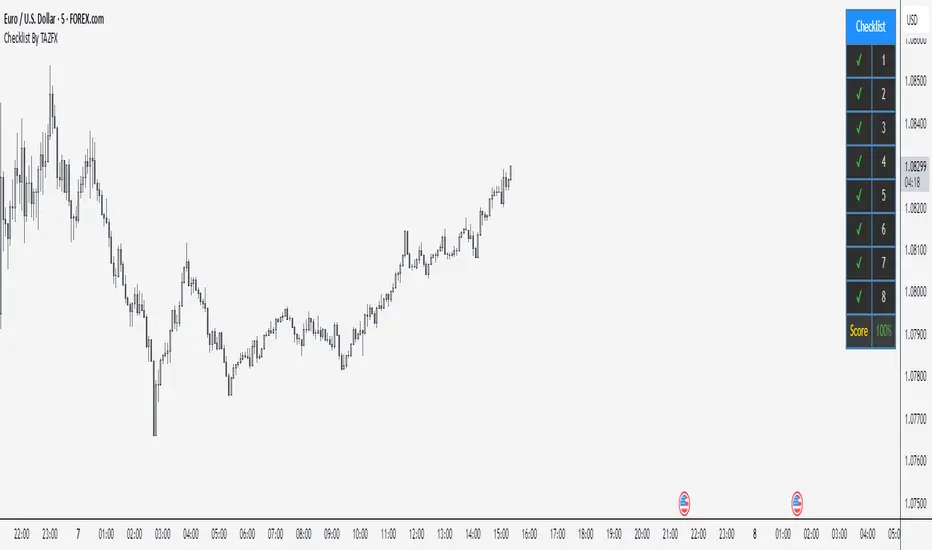
Trading Checklist is a customizable indicator designed for traders who want to stay disciplined and stick to their trading rules. Using this indicator, you can easily create and display your own personalized checklist of trading rules directly on your TradingView chart.
1. Customizable Settings:
•Positioning: Place the table in one of nine positions on the chart (e.g., bottom left, top right).
•Header: Modify the banner text, size, and color.
•Row Content: Define text for each row and control visibility.
•Appearance: Adjust text and background colors.
2. Checklist Table:
•Displays up to 8 rows with checkboxes (✅/❌) and custom labels for trade evaluation.
•Useful for tracking whether specific trade conditions or rules are met.
3. Trade Score Calculation:
•The Trade Score is a percentage that shows how many of your checklist items are checked compared to the total visible items.
1. Customizable Settings:
•Positioning: Place the table in one of nine positions on the chart (e.g., bottom left, top right).
•Header: Modify the banner text, size, and color.
•Row Content: Define text for each row and control visibility.
•Appearance: Adjust text and background colors.
2. Checklist Table:
•Displays up to 8 rows with checkboxes (✅/❌) and custom labels for trade evaluation.
•Useful for tracking whether specific trade conditions or rules are met.
3. Trade Score Calculation:
•The Trade Score is a percentage that shows how many of your checklist items are checked compared to the total visible items.
Notas de Lançamento
UPDATESymbol-Specific: You pick one symbol (e.g., EURUSD) in the settings, and the checklist only appears on that chart. It’s invisible on others.
Notas de Lançamento
UPDATE - Checklist: Up to 8 rows with checkboxes (✔ for yes, ✘ for no) and editable text (e.g., "1" or "Entry Signal").
- Trade Score: Shows a percentage (e.g., "75%") based on checked boxes, colored green (75%+), yellow (50-74%), or red (below 50%).
- Symbol-Specific: Set a "Pinned Symbol" (e.g., EURUSD) in settings—it only shows on that chart and hides elsewhere.
- Modern Design: Dark gray background, blue header, steel blue borders, and a compact layout option.
- Tooltips: Hover over row names in settings for hints (e.g., "Criteria 1"—customizable).
- Customizable: Adjust position, size, colors, and row count (1-8).
Notas de Lançamento
.Notas de Lançamento
.Notas de Lançamento
Border color updatedScript de código aberto
Em verdadeiro espírito do TradingView, o criador deste script o tornou de código aberto, para que os traders possam revisar e verificar sua funcionalidade. Parabéns ao autor! Embora você possa usá-lo gratuitamente, lembre-se de que a republicação do código está sujeita às nossas Regras da Casa.

Aviso legal
As informações e publicações não se destinam a ser, e não constituem, conselhos ou recomendações financeiras, de investimento, comerciais ou de outro tipo fornecidos ou endossados pela TradingView. Leia mais nos Termos de Uso.
Script de código aberto
Em verdadeiro espírito do TradingView, o criador deste script o tornou de código aberto, para que os traders possam revisar e verificar sua funcionalidade. Parabéns ao autor! Embora você possa usá-lo gratuitamente, lembre-se de que a republicação do código está sujeita às nossas Regras da Casa.
Aviso legal
As informações e publicações não se destinam a ser, e não constituem, conselhos ou recomendações financeiras, de investimento, comerciais ou de outro tipo fornecidos ou endossados pela TradingView. Leia mais nos Termos de Uso.