OPEN-SOURCE SCRIPT
Atualizado Max/Min Levels
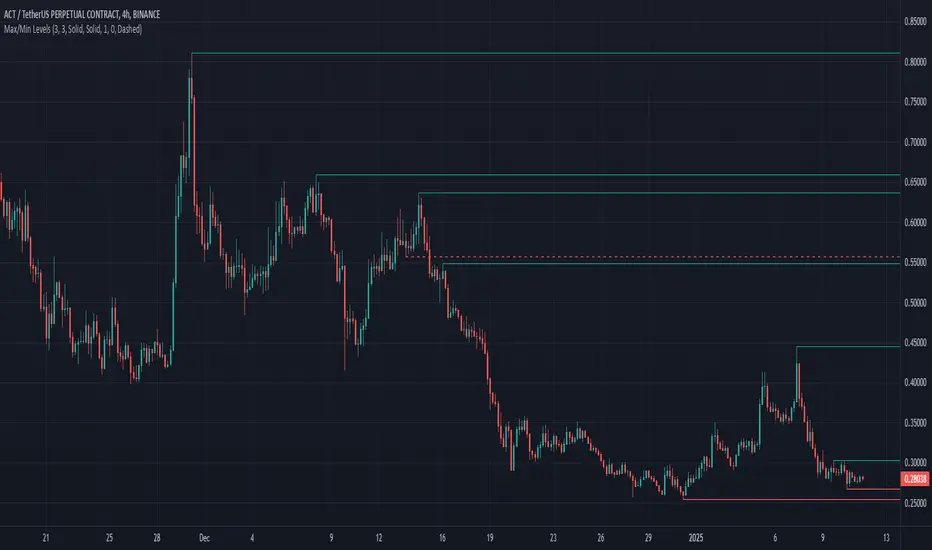
Highlights highs and lows that match the search criteria. A high is considered to be broken if the candlestick breaks through its shadow
A three-candlestick pattern will match the parameters:
A five-candlestick pattern will match the parameters:
A three-candlestick pattern will match the parameters:
- Candle before - 1
- Candle after - 1
A five-candlestick pattern will match the parameters:
- Candle before - 2
- Candle after - 2
Notas de Lançamento
Highlights highs and lows that match the search criteria. A high is considered to be broken if the candlestick breaks through its shadowA three-candlestick pattern will match the parameters:
- Candle before - 1
- Candle after - 1
A five-candlestick pattern will match the parameters:
- Candle before - 2
- Candle after - 2
Notas de Lançamento
Fixed the issue of false lines appearing at the beginning of the chartNotas de Lançamento
Added the option to delete the line immediately after it is crossed or after the candle formation is completeNotas de Lançamento
In history, the line continues until it touches a candlestick.Also, the number of lines that can be displayed on the chart has been increased to 150.
Notas de Lançamento
Shows the highs and lows that were broken by a single candleNotas de Lançamento
Added the ability to set the number of lines to be displayed on the chartNotas de Lançamento
Added the ability to enable level breakdown notificationsFirst, mark which notifications you want to receive, about a level breakout or a breakout of resistance and support levels (dashed line on the chart).
Create a new alert and in the "Condition" column select the indicator name. In the column below select "Any alert() function call" if it is not selected and click the "Create" button. That's it, you're done
Notas de Lançamento
Added the ability to use the indicator in Pine Screener. Allows you to conveniently search for coins that have a broken level or a pricked level, and also how many percent to the nearest level- New Tab -> Screeners -> Pine (Beta)
https://i.postimg.cc/T1WqyWv4/Max-Min-Screener-1.jpg
- A list with coin pairs
- A timeframe for analysis
- Indicator settings
- Setup the indicator according to your requirements
- Check the box next to "Candle number" to make the indicator work in "Pine Screener" mode
- 0 - analysis of the current candle, 1 - analysis of the second candle on the chart, 2,3... etc.
- Confirm settings
- Click "Scan"
After that, you will see a window with the data
https://i.postimg.cc/wMcJYCCc/Max-Min-Screener-2.jpg
- To Up, To Down, To Broken Up, To Broken Down - Shows how many percent to the nearest level. If the value is negative, it means that the price broke the level
- Pricked Up, Pricked Down, Pricked Broken Up, Pricked Broken Down - "1" means that the price pierced the level with its shadow
Good luck with your search everyone!
Script de código aberto
Em verdadeiro espírito do TradingView, o criador deste script o tornou de código aberto, para que os traders possam revisar e verificar sua funcionalidade. Parabéns ao autor! Embora você possa usá-lo gratuitamente, lembre-se de que a republicação do código está sujeita às nossas Regras da Casa.

Aviso legal
As informações e publicações não se destinam a ser, e não constituem, conselhos ou recomendações financeiras, de investimento, comerciais ou de outro tipo fornecidos ou endossados pela TradingView. Leia mais nos Termos de Uso.
Script de código aberto
Em verdadeiro espírito do TradingView, o criador deste script o tornou de código aberto, para que os traders possam revisar e verificar sua funcionalidade. Parabéns ao autor! Embora você possa usá-lo gratuitamente, lembre-se de que a republicação do código está sujeita às nossas Regras da Casa.
Aviso legal
As informações e publicações não se destinam a ser, e não constituem, conselhos ou recomendações financeiras, de investimento, comerciais ou de outro tipo fornecidos ou endossados pela TradingView. Leia mais nos Termos de Uso.